Features
Everything Agent Tank does
A local dashboard and JSON API for your coding agents’ usage limits, with history, sparklines, multiple accounts, context windows and credits. Everything below is in Agent Tank 0.10.0.
Usage history
Since 0.10.0Every refresh writes one row per metric to a local SQLite database at ~/.agent-tank/history.db, using Node’s built-in node:sqlite, so there is no extra dependency. Each row carries the account id, the metric (for example session, weeklyAll or fiveHour), the percent used and the capture time; Codex also records its context-window use and credit balance.
- Retention. 14 days by default; older rows are deleted on write. Change it with
--history-retention-days(Retention). - Location. Use another file with
--history-db(History database), or turn recording off with--no-history(Record history). - Runtime. History needs Node.js 22.5+. On older runtimes Agent Tank logs one warning at startup, keeps running without history and reports
store: "none". - No duplicates. Usage that was not re-captured since it was last recorded, such as a failed refresh that keeps cached usage or a refresh skipped by the cooldown, is not recorded again.
agent-tank --history-retention-days 7   # delete rows older than 7 days on write
agent-tank --history-db /tmp/at.db      # use a different database file
agent-tank --no-history                 # disable history recording
agent-tank --no-history-chart # keep recording, hide the dashboard sparklineA series needs no application code. Query the usage_metrics table directly:
sqlite3 ~/.agent-tank/history.db \
  "SELECT recorded_at, percent_used FROM usage_metrics
WHERE agent_id='work' AND metric_key='weekly' ORDER BY recorded_at_ms"Or ask the API: GET /history/:id returns one series per metric for an account.
since: Only points at or after this time (ISO 8601 or epoch ms).until: Only points at or before this time (ISO 8601 or epoch ms).metric: Only the series with this metric_key.view: view=chart returns only plottable series (percent units with at least two points), each point reduced to { "t", "percent" }.
curl -s 'http://127.0.0.1:3456/history/claude?view=chart&metric=session&since=2026-10-16T13:00:00.000Z'{
"agent": "claude",
"store": "sqlite",
"retention_days": 14,
"series": [
{
"key": "session",
"label": "Current session",
"model": null,
"cycle": "session",
"points": [
{
"t": "2026-10-16T13:00:00.000Z",
"percent": 0
},
{
"t": "2026-10-16T14:00:00.000Z",
"percent": 9
},
{
"t": "2026-10-16T15:00:00.000Z",
"percent": 31
}
]
}
]
}Dashboard sparklines
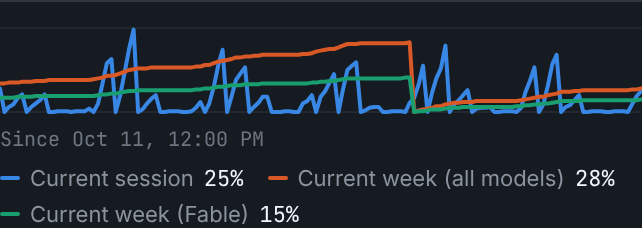
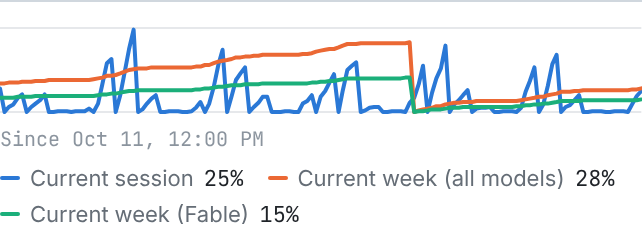
Since 0.10.0Each agent card on the dashboard shows a sparkline of its usage history: one line per tracked metric on a fixed 0–100% scale, with a legend of each metric’s latest value. Hover the chart to read values at an earlier time.
- It is redrawn after every auto-refresh poll and after a card’s refresh button, without reloading the page.
- Until a metric has at least two recorded points, the card shows “Not enough history yet”.
- It is on by default. Hide it, and keep recording, with
--no-history-chart,AGENT_TANK_HISTORY_CHART=0or"history": { "chart": false }(Dashboard sparkline). - When recording is off, the chart is never rendered.
Multiple accounts per provider
Since 0.9.11Monitor several accounts, including several of the same provider. Repeat --agent provider[:alias][=config-path] once per account, or list them in the config file’s agents array. Each account has its own config directory, dashboard label, history and refresh endpoints.
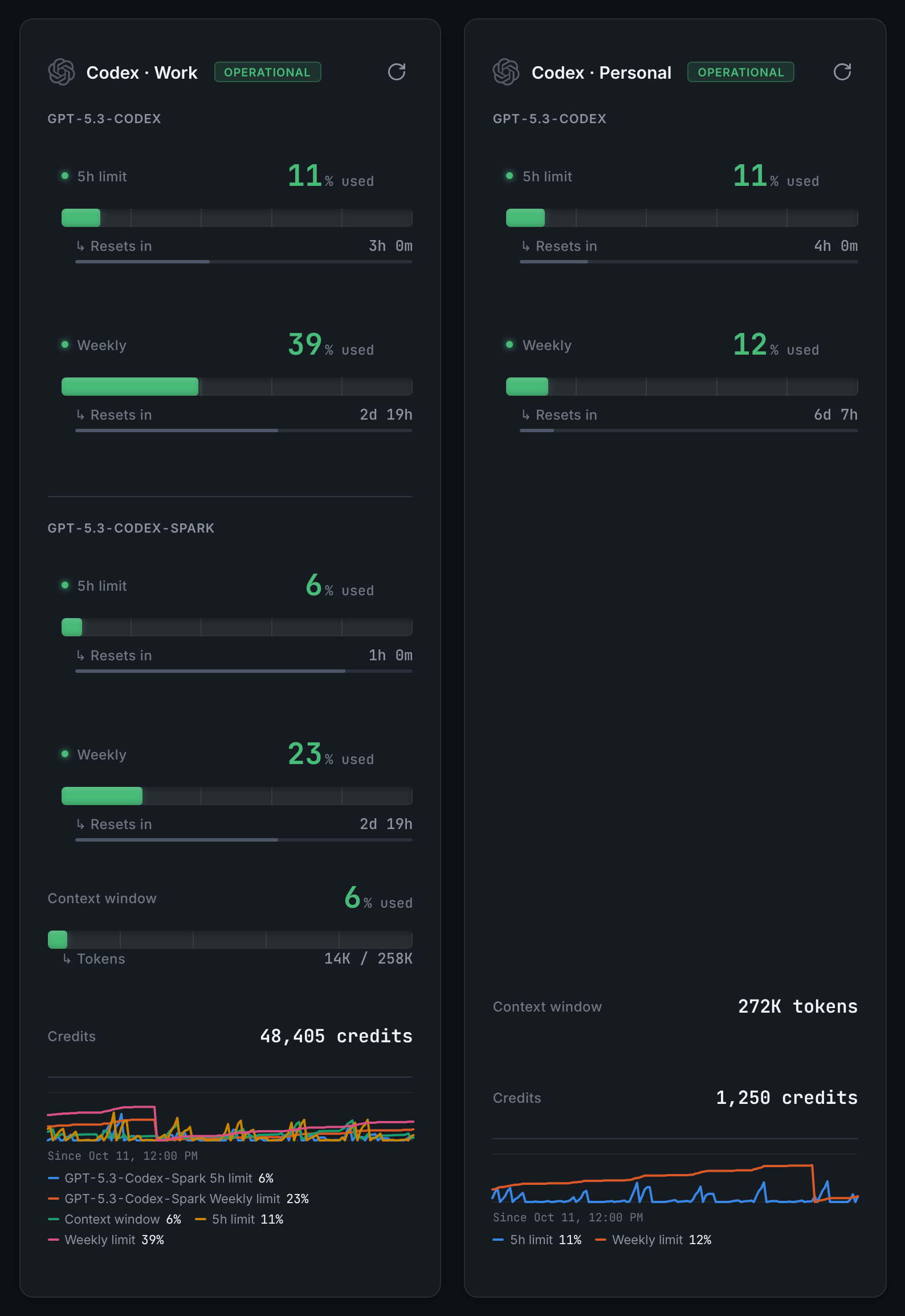
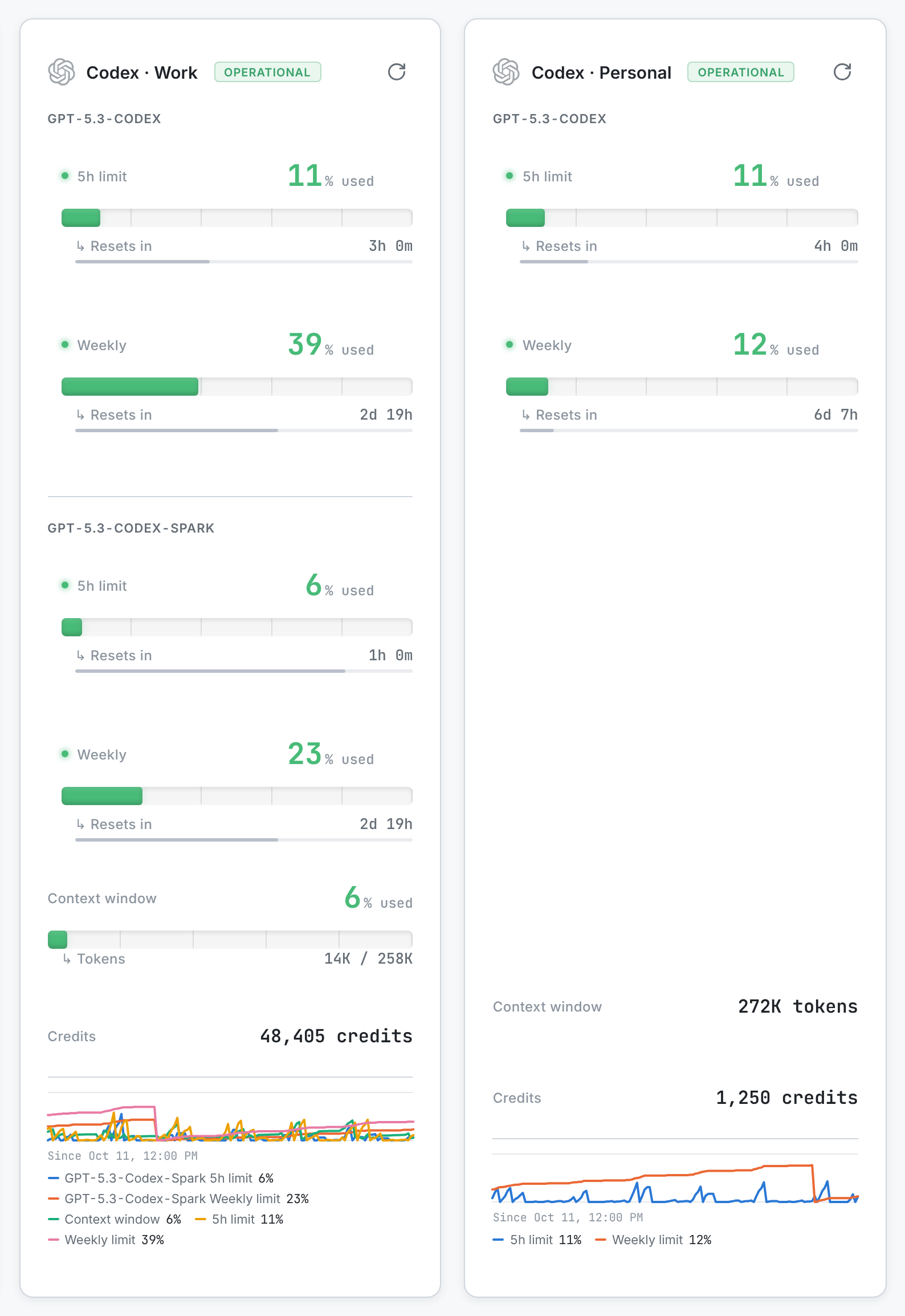
Two Codex accounts on the command line:
agent-tank \
  --agent codex:work=/srv/accounts/codex-work \
--agent codex:personal=/srv/accounts/codex-personalEach path is passed to Codex as CODEX_HOME, so each account keeps its own login. The alias becomes the account id, so /status/work returns the first account:
curl -s http://127.0.0.1:3456/status/work | jq '{id, provider, plan, status, windows: [.windows[] | {label, used_percent}]}'{
"id": "work",
"provider": "codex",
"plan": "pro",
"status": "ok",
"windows": [
{
"label": "5h limit",
"used_percent": 11
},
{
"label": "Weekly limit",
"used_percent": 39
},
{
"label": "GPT-5.3-Codex-Spark 5h limit",
"used_percent": 6
},
{
"label": "GPT-5.3-Codex-Spark Weekly limit",
"used_percent": 23
}
]
}The other account is /status/personal, and /history/work and POST /refresh/work work the same way.
id vs alias. The id (or the CLI alias after :) is the key returned by /status and used by the account-specific endpoints. If both id and alias are set in JSON, id is the API key and alias is the dashboard label. See Multiple accounts for the config file version.
Context window and credits
Since 0.10.0Every provider object has a context_window and a credits field, null when unknown. context_window.source says where the size came from:
cli: reported by the CLI itself. Only this source carriesused_tokensand the used and remaining percentages.override: set with thecontextWindowsconfig key.known-model: the reported model matched Agent Tank’s built-in table.
credits is the Codex credit balance. Claude’s extra usage is a dollar budget, not credits, so it stays in raw.usage.extraUsage. The dashboard cards show a context-window row and a credits row when they are known.
{
  "context_window": {
    "total_tokens": 258000,
    "used_tokens": 14240,
    "used_percent": 5.52,
    "remaining_percent": 94.48,
    "model": "gpt-5.3-codex",
    "source": "cli"
  },
  "credits": {
    "remaining": 48405,
    "unit": "credits"
  }
}| Provider | context_window | credits |
|---|---|---|
| Claude Code | Looked up from the model Claude reports on /status (e.g. claude-opus-5-5) in Agent Tank's built-in table, reported with source "known-model", or set with the contextWindows config key (source "override"). | Always null. Claude's extra usage is a dollar budget, not credits, and stays under raw.usage.extraUsage. |
| OpenAI Codex | Reported by Codex itself (/status or its app-server) with source "cli", including used_tokens and percentages. Codex reports it only while it has an active session, so it is often null from a fresh codex process. | The Codex credit balance, { "remaining": 48405, "unit": "credits" }, or null when Codex doesn't report one. History records it as the credits series. |
| Antigravity CLI | Looked up from the model named in the startup banner (source "known-model"). Gemini 4 Argon's window is not yet published, so it is null unless set with the contextWindows config key (e.g. { "gemini-4-argon": 1048576 }, source "override"). | Always null. |
Add or correct a model’s size with contextWindows (Context window sizes); values set here are reported with source: "override":
{
  "contextWindows": {
    "gemini-4-argon": 1048576
  }
}Background mode
Since 0.9.8agent-tank --background starts Agent Tank as a detached process, prints its PID and log path, then exits, so it keeps running after you close the terminal. AGENT_TANK_BACKGROUND=1 does the same.
$ agent-tank --background
Agent Tank started in the background with PID <pid>
Background log: <temp dir>/agent-tank-<pid>-<time>.logAGENT_TANK_BACKGROUND_LOGsets the file that receives the background process’s output (Background log); by default it is a new log file in the system temp directory.AGENT_TANK_BACKGROUND_GRACE_MSsets how long the parent waits before reporting success (Startup grace period).
At startup, Agent Tank warns when other Agent Tank processes are already running. The warning lists each PID with its command line, with credential flags redacted, and tells you how to stop them with kill or kill -9. On an interactive terminal the header is shown in bold red.
Warning: other Agent Tank process(es) already running:
  PID <pid>: agent-tank --auth-token [redacted]
If this instance uses the same port, startup will fail; choose a different --port or stop the other process.
To stop the process(es) above, run: kill <pid>
If a process does not exit, force it with: kill -9 <pid>
Tip: start Agent Tank in the background with agent-tank --background
Pace indicators and reset countdowns
Since 0.9.0The dashboard counts down to each window’s reset and shows whether a limit is being used faster than the time window would suggest. Pace compares how much of the window you have consumed with how much of its time has elapsed.
Since 0.10.0 every window in the API carries resets_at (ISO 8601), resets_in_seconds and pace: { ratio, burning_fast }, or pace: null when there is no pace signal. A ratio above 1 means usage is out-pacing the window, and burning_fast says whether it is on track to run out early:
{
  "type": "five_hour",
  "label": "5h limit",
  "model": null,
  "used_percent": 11,
  "remaining_percent": 89,
  "resets_at": "2026-10-17T15:00:00.000Z",
  "resets_in_seconds": 10800,
  "pace": {
    "ratio": 0.28,
    "burning_fast": false
  }
}Smart refresh
Since 0.9.0Agent Tank refreshes in the background with one of three strategies (Refresh mode):
| Mode | Description |
|---|---|
activity | Default. Watches known local agent directories and refreshes when activity is detected. |
interval | Refreshes on a fixed timer (--auto-refresh-interval). |
none | No background refresh. Use manual refresh only (POST /refresh or the dashboard buttons). |
In activity mode it watches the agents’ local directories (Claude: ~/.config/claude/projects/ and ~/.claude/, Codex: ~/.codex/sessions/ and ~/.codex/, Antigravity: ~/.gemini/antigravity-cli/) and refreshes after you use a CLI. If no suitable directories are found, it falls back to interval mode.
Since 0.9.5 a per-agent cooldown of 30 seconds applies to manual refreshes, startup refreshes and detected activity, which avoids unnecessary polling and CLI-side rate limiting. Change it with --refresh-cooldown, or set it to 0 to turn it off (Refresh cooldown).
agent-tank --auto-refresh-mode interval
agent-tank --refresh-cooldown 60Also included
-
Live tab title and favicon Since 0.9.0
The dashboard updates the browser tab’s title and favicon, so you can track usage from the tab strip.
-
Docker bridge binding Since 0.9.4
When
--hostis omitted, Agent Tank also binds the Docker bridge gateway addresses, so containers on the same host can reach it without exposing it publicly.--no-dockerbinds localhost only. -
Basic and Bearer auth Since 0.9.0
Protect the dashboard and API with HTTP Basic Auth (
--auth-user,--auth-pass), a Bearer token (--auth-token), or both. PreferAGENT_TANK_PASSandAGENT_TANK_TOKEN: flags are visible in the process list. -
Claude API mode Since 0.9.0
--claude-apireads the OAuth credentials Claude Code already uses and calls the Anthropic OAuth usage API instead of running/usage. It is usually faster, and falls back to PTY mode if the API path fails. -
One-shot JSON Since 0.9.0
agent-tank --once --jsonfetches usage once, prints{ "providers": [...] }and exits, without starting the HTTP server. Handy for scripts. -
Programmatic AgentTank class Since 0.9.0
const { AgentTank } = require('agent-tank')runs the same watcher in your own Node.js code:getNormalizedStatus()returns whatGET /statusdoes,refreshAgent(id)refreshes one account, andstop()closes the history database.
Get started
Install Agent Tank and open the dashboard on http://127.0.0.1:3456:
npm install -g agent-tank
agent-tank-
Prerequisites, install, first run and troubleshooting.
-
Endpoints and the canonical response shape.