Track Antigravity CLI usage limits locally
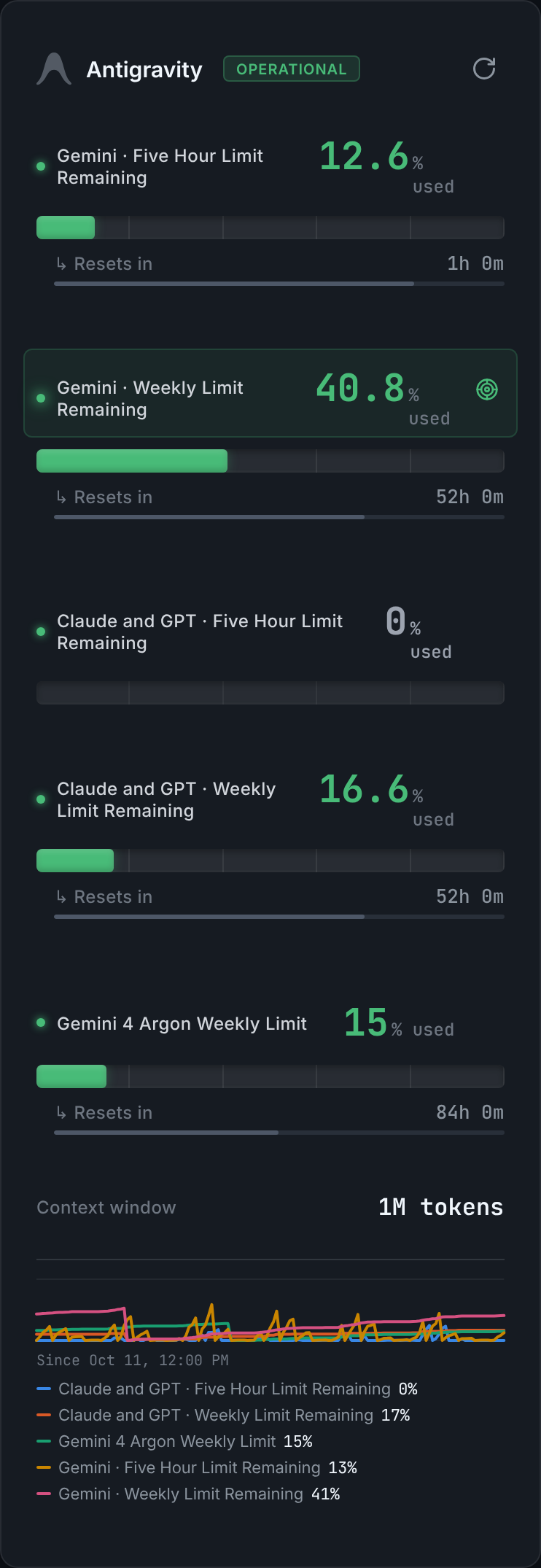
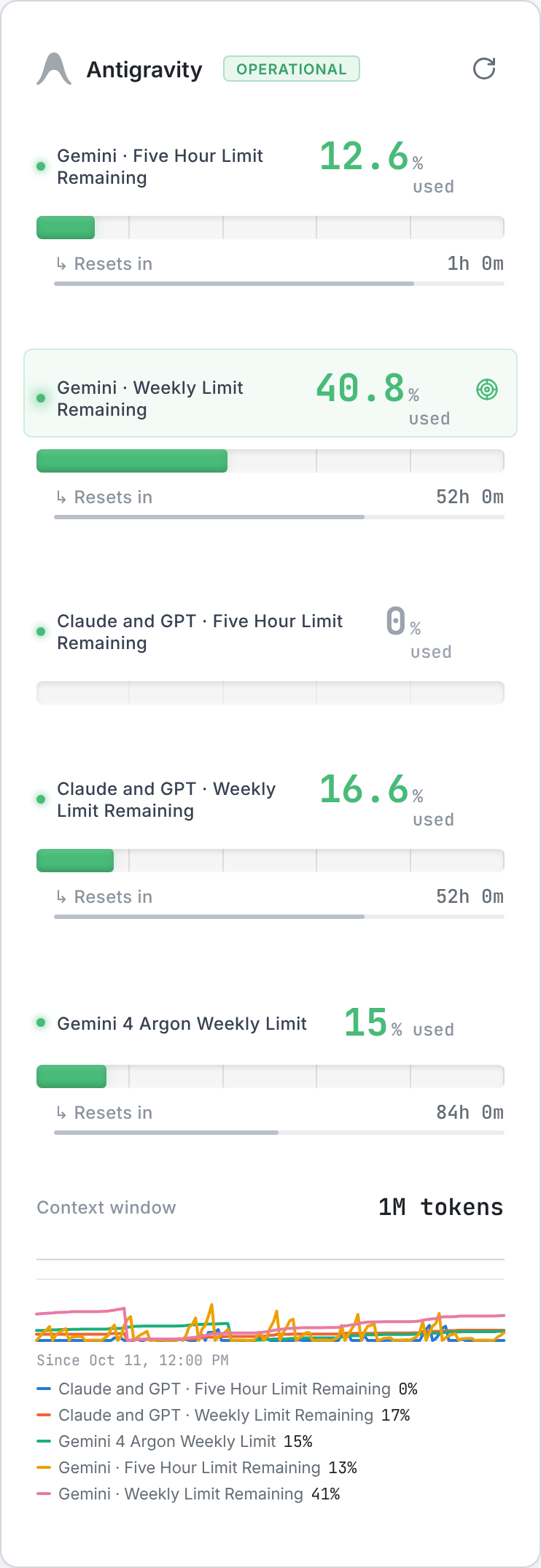
Antigravity groups its quotas by model family, such as Gemini models and Claude and GPT models, and each group has a five-hour and a weekly limit. Gemini 4 Argon is a separate quota pool with its own weekly limit. Agent Tank shows how much of each limit you have used and when it resets, on a local dashboard and JSON API.
npm install -g agent-tank
agent-tank --agyNew to Agent Tank? Read Getting started
How Antigravity limits work
Antigravity groups its quotas by model family, such as Gemini models and Claude and GPT models, and each group has a five-hour and a weekly limit. Gemini 4 Argon is a separate quota pool with its own weekly limit.
Agent Tank reports each limit as a window with a type (session, five_hour or weekly), the percentage used and remaining, and the reset time in ISO 8601, so Antigravity looks the same in the API as every other provider. For how the windows reset and what happens at a limit, read How five-hour and weekly usage windows work (Claude, Codex, Antigravity) and Claude vs Codex vs Antigravity: what each is good at and how their limits compare and How to avoid running out of limits mid-task and Antigravity quotas explained, including Gemini 4 Argon and Google AI Pro vs Ultra for Antigravity and Show coding agent usage in tmux, Waybar or SwiftBar and Track work and personal accounts together and How fast am I using my Claude Code limit? Pace and burn rate and Read coding agent usage from a script or VS Code task.
For plan details, see Google’s Antigravity CLI documentation.
What Agent Tank tracks
| Window | Type | Model | Notes |
|---|---|---|---|
| Gemini · Five Hour Limit Remaining | five_hour |
Gemini | Grouped limits use the group name as model |
| Gemini · Weekly Limit Remaining | weekly |
Gemini | Grouped limits use the group name as model |
| Gemini 4 Argon Weekly Limit | weekly |
Gemini 4 Argon | Separate quota pool reported by agy 1.3.x |
| Plan | The plan shown next to the account in Antigravity's startup banner, lowercased ("google ai pro"); null when no plan is shown. | ||
| Context window | Looked up from the model named in the startup banner (source "known-model"). Gemini 4 Argon's window is not yet published, so it is null unless set with the contextWindows config key (e.g. { "gemini-4-argon": 1048576 }, source "override"). | ||
| Credits | Always null. | ||
How it reads the data
Runs /usage in the local agy CLI and reads its grouped quota screen. Everything happens on your machine, through the agy CLI you are already signed in to.
- Antigravity support uses the agy CLI and reads the interactive /usage output.
- Limits are grouped by the section they appear under (GEMINI MODELS, CLAUDE AND GPT MODELS, …), and shared labels such as Weekly Limit are qualified with their group.
- Antigravity 1.3.x also reports Gemini 4 Argon as a separate quota pool under a GEMINI 4 ARGON header, reported as its own weekly limit.
- A limit showing "Quota available" has no pending reset, so its reset fields are null.
- In the default activity refresh mode, Agent Tank watches
~/.gemini/antigravity-cli/and refreshes after you use the CLI.
Agent Tank never:
- scrape provider websites
- read browser cookies
- depend on a logged-in browser session
- MITM or inspect your network traffic
- send your usage data to a remote service
In the dashboard
Sample API output
Every account has its own endpoint. This is the agy account:
curl -s http://127.0.0.1:3456/status/agy | jq{
"id": "agy",
"provider": "antigravity",
"plan": "google ai pro",
"status": "ok",
"last_updated": "2026-10-17T12:00:00.000Z",
"error": null,
"windows": [
{
"type": "five_hour",
"label": "Gemini · Five Hour Limit Remaining",
"model": "Gemini",
"used_percent": 12.63,
"remaining_percent": 87.37,
"resets_at": "2026-10-17T13:00:00.000Z",
"resets_in_seconds": 3600,
"pace": {
"ratio": 0.16,
"burning_fast": false
}
},
{
"type": "weekly",
"label": "Gemini · Weekly Limit Remaining",
"model": "Gemini",
"used_percent": 40.76,
"remaining_percent": 59.24,
"resets_at": "2026-10-19T16:00:00.000Z",
"resets_in_seconds": 187200,
"pace": {
"ratio": 0.59,
"burning_fast": false
}
},
{
"type": "five_hour",
"label": "Claude and GPT · Five Hour Limit Remaining",
"model": "Claude and GPT",
"used_percent": 0,
"remaining_percent": 100,
"resets_at": null,
"resets_in_seconds": null,
"pace": null
},
{
"type": "weekly",
"label": "Claude and GPT · Weekly Limit Remaining",
"model": "Claude and GPT",
"used_percent": 16.58,
"remaining_percent": 83.42,
"resets_at": "2026-10-19T16:00:00.000Z",
"resets_in_seconds": 187200,
"pace": {
"ratio": 0.24,
"burning_fast": false
}
},
{
"type": "weekly",
"label": "Gemini 4 Argon Weekly Limit",
"model": "Gemini 4 Argon",
"used_percent": 15.03,
"remaining_percent": 84.97,
"resets_at": "2026-10-21T00:00:00.000Z",
"resets_in_seconds": 302400,
"pace": {
"ratio": 0.3,
"burning_fast": false
}
}
],
"context_window": {
"total_tokens": 1048576,
"used_tokens": null,
"used_percent": null,
"remaining_percent": null,
"model": "Gemini 3.1 Pro",
"source": "known-model"
},
"credits": null,
"raw": {
"…": "original per-provider payload"
}
}raw, the untouched Antigravity payload, is abbreviated here. The sample is synthetic, generated by Agent Tank 0.10.0’s own normalizer.
List each window’s usage and reset time:
curl -s http://127.0.0.1:3456/status/agy | jq '.windows[] | {label, used_percent, resets_at}'Install and run
Install Agent Tank (Node.js 18+) and start it with Antigravity only:
npm install -g agent-tank
agent-tank --agyIt needs the Antigravity CLI CLI installed, signed in and on your PATH as agy (/usage command support required). Agent Tank 0.10.0 was verified with version 1.4.0. Check yours with:
agy --versionMultiple accounts
Add one --agent per account as agy:<alias>=<path>. Each path is passed to agy as GEMINI_CLI_HOME, so every account keeps its own login, and the alias becomes its id in /status/<alias>:
agent-tank \
  --agent agy:work=/srv/accounts/agy-work \
--agent agy:personal=/srv/accounts/agy-personalSee Accounts and providers for the config file equivalent, or Getting started for the full setup.
Notes
- A limit showing "Quota available" has no pending reset, so its resets_at and resets_in_seconds are null.
- Limits without a percentage, such as a "Disabled: …" five-hour limit after the weekly limit is hit, are not reported as windows.
- The API id and flag are agy, while the canonical provider value is "antigravity".
Related
- Claude Code usage limit tracker
- OpenAI Codex usage limit tracker
- API reference
- Configuring accounts
- Context window and credits
- How five-hour and weekly usage windows work (Claude, Codex, Antigravity)
- Claude vs Codex vs Antigravity: what each is good at and how their limits compare
- How to avoid running out of limits mid-task
- Antigravity quotas explained, including Gemini 4 Argon
- Google AI Pro vs Ultra for Antigravity
- Show coding agent usage in tmux, Waybar or SwiftBar
- Track work and personal accounts together
- How fast am I using my Claude Code limit? Pace and burn rate
- Read coding agent usage from a script or VS Code task