Limits and plans
Antigravity quotas explained, including Gemini 4 Argon
Antigravity does not give you one quota but several: one per group of models, each with its own five-hour and weekly limit, and a separate pool for Gemini 4 Argon. This guide explains how the groups work, what the CLI’s quota screen is telling you, how plans change the picture, and how to keep track of every group at once.
Plans and limits change often. Numbers here were checked on the dates listed under Sources; always confirm on the provider’s own pages.
Quota groups
Antigravity measures usage per group of models rather than per account. Google’s models page describes it this way: The model selector shows quota per group (Gemini Models; Claude and GPT models), each with a Weekly Limit Remaining and a Five Hour Limit Remaining1. Using a Gemini model draws on the Gemini group; using a Claude or GPT model draws on the other one. Running out in one group leaves the other untouched, so switching model family can keep you working.
Gemini 4 Argon is the exception. Gemini 4 Argon is available for Google AI Pro and Ultra in Google Antigravity2, and on the models page it is marked Available with paid Google AI Pro plans or on trial with eligible premium devices3. Google’s plans and models pages do not say how its quota is sized. What the CLI shows is a separate pool: Antigravity 1.3.x also reports Gemini 4 Argon as a separate quota pool under a GEMINI 4 ARGON header, reported as its own weekly limit.
Agent Tank reads these groups from the CLI’s quota screen. Limits are grouped by the section they appear under (GEMINI MODELS, CLAUDE AND GPT MODELS, …), and shared labels such as Weekly Limit are qualified with their group. Each window’s model is the group name, so you can tell the Gemini weekly limit from the Claude and GPT one without parsing labels.
Five-hour and weekly limits per group
Each group has two limits that apply together. The five-hour limit refills often and protects against a single heavy burst; the weekly limit caps the week as a whole. When the weekly limit of a group is used up, a refilled five-hour limit does not help that group until the week resets. Agent Tank’s provider notes put it this way: Limits without a percentage, such as a "Disabled: …" five-hour limit after the weekly limit is hit, are not reported as windows.
How much work fits into either limit is not a number of prompts. The rate limits correlate with the amount of work done by the agent4. You receive more prompts when your tasks are straightforward and the agent can complete the work quickly, while more complex tasks consume more quota5. Google adds two caveats. Usage limits for this service are subject to modification6. The baseline rate limits are primarily determined by available capacity and exist to prevent abuse7.
Here are the windows from Agent Tank’s synthetic sample. Antigravity reports what is left, so remaining_percent is the number to read here:
[
  {
    "type": "five_hour",
    "label": "Gemini · Five Hour Limit Remaining",
    "model": "Gemini",
    "remaining_percent": 87.37,
    "resets_at": "2026-10-17T13:00:00.000Z"
  },
  {
    "type": "weekly",
    "label": "Gemini · Weekly Limit Remaining",
    "model": "Gemini",
    "remaining_percent": 59.24,
    "resets_at": "2026-10-19T16:00:00.000Z"
  },
  {
    "type": "five_hour",
    "label": "Claude and GPT · Five Hour Limit Remaining",
    "model": "Claude and GPT",
    "remaining_percent": 100,
    "resets_at": null
  },
  {
    "type": "weekly",
    "label": "Claude and GPT · Weekly Limit Remaining",
    "model": "Claude and GPT",
    "remaining_percent": 83.42,
    "resets_at": "2026-10-19T16:00:00.000Z"
  },
  {
    "type": "weekly",
    "label": "Gemini 4 Argon Weekly Limit",
    "model": "Gemini 4 Argon",
    "remaining_percent": 84.97,
    "resets_at": "2026-10-21T00:00:00.000Z"
  }
]“Quota available” and “Refreshes in”
The quota screen shows one of two things under each limit:
- Refreshes in. A countdown to the next refresh, in hours and minutes. Agent Tank converts it into
resets_at(ISO 8601) andresets_in_seconds, and uses the group’s five-hour or weekly length forpace. - Quota available. The limit has no countdown running. A limit showing "Quota available" has no pending reset, so its reset fields are null. In the sample that is the
Claude and GPT · Five Hour Limit Remainingwindow, which also haspace: null.
A null reset is not an error. Scripts that sort or alert on reset times should skip it rather than treat it as “now”. How five-hour and weekly usage windows work covers resets for all three providers.
Plans
Rate limits and model availability differ based on your Google AI plan8. All plans get access to all product features, such as scheduled tasks and the CLI9. The difference between plans is the size and refresh of the quota:
- Google AI Ultra10: the highest, most generous quota, refreshed every five hours, with the highest weekly rate limits11.
- Google AI Pro12: a high, generous quota, refreshed every five hours until the weekly limit is reached13. A higher weekly rate limit14.
- Without either plan: a meaningful quota, refreshed weekly15.
Google does not publish prices or quota sizes on these pages. The CLI’s startup banner shows the plan next to your account, and Agent Tank keeps it: The plan shown next to the account in Antigravity's startup banner, lowercased ("google ai pro"); null when no plan is shown. In the sample, plan is "google ai pro". Google AI Pro vs Ultra for Antigravity compares the plans side by side.
When a group runs out, Google documents paid overages rather than more quota. Once a model’s baseline quota is exhausted, the AI Credit Overages setting decides: Never (wait until the baseline quota refreshes) or Always (use purchased AI credits, consumed at standard Gemini Enterprise consumption pricing)16. The CLI’s useG1Credits setting (off by default, not available for business accounts) uses your AI credits for model requests after your plan’s quota runs out17. /credits shows remaining G1 credits and purchase links18. There is currently no support for bring-your-own-key (BYOK) or bring-your-own-endpoint for additional rate limits19.
Context window for Gemini 4 Argon
Agent Tank also reports a context_window for the model you are using: Looked up from the model named in the startup banner (source "known-model"). Gemini 4 Argon's window is not yet published, so it is null unless set with the contextWindows config key (e.g. { "gemini-4-argon": 1048576 }, source "override").
If you know the size for your account, add it to your config file with the contextWindows key:
{
  "contextWindows": {
    "gemini-4-argon": 1048576
  }
}Keys are matched against the model name the CLI reports, so the same override works however the banner spells it. See context window sizes in the configuration reference. To see how full the context is inside the CLI, /context opens the context usage visualization panel20.
The built-in way vs Agent Tank
In the Antigravity CLI
Type /usage in agy. Google’s CLI reference lists it as /usage (alias /quota): display model quota usage21. It shows each group with its remaining percentage and “Refreshes in” or “Quota available” under each limit. For the desktop app, Google says: You can view baseline quota usage across models on the Settings page22.
In Agent Tank
Antigravity support uses the agy CLI and reads the interactive /usage output. It does so on a schedule, so the dashboard card always shows every group, the Argon pool and their countdowns:
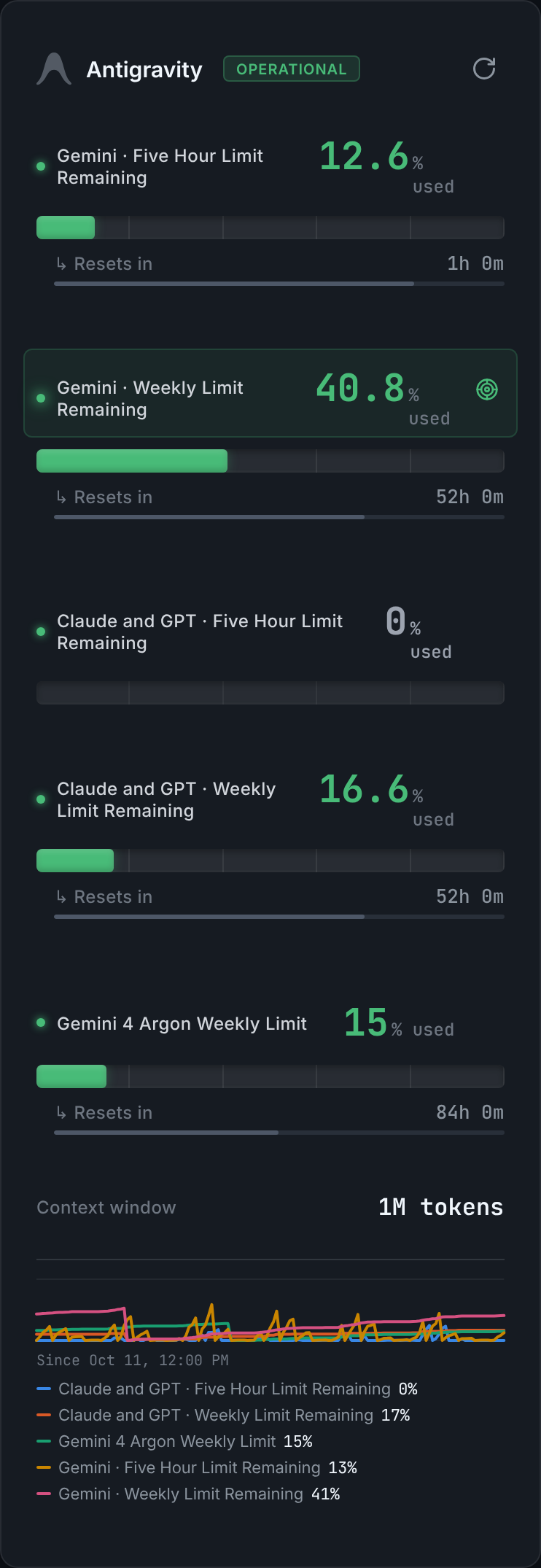
The local API gives scripts the same view. This prints each group’s remaining quota and reset time:
curl -s http://127.0.0.1:3456/status/agy | jq '.windows[] | {model, type, remaining_percent, resets_at}'The API id and flag are agy, while the canonical provider value is "antigravity". The Gemini 4 Argon Weekly Limit window has model: "Gemini 4 Argon". For ways to act on these numbers before a group runs out, see how to avoid running out of limits mid-task.
Multiple Antigravity accounts
If you legitimately have more than one Google account with Antigravity, each has its own quota groups. Agent Tank passes each account its own config home as GEMINI_CLI_HOME; sign in to each directory once with agy, then repeat --agent once per account:
agent-tank \
  --agent agy:work=~/.agy-work \
--agent agy:personal=~/.agy-personalEach account gets its own card, history and endpoint. The config-file version is under accounts and providers. Use each account only as Google’s terms allow; they say: You must not abuse, harm, interfere with, or disrupt the Service23.
For how Agent Tank reads Antigravity in more depth, see the Antigravity CLI usage limit tracker page. Claude vs Codex vs Antigravity compares its groups with the other two providers’ limits, and getting started installs Agent Tank.
Sources
Every plan name, number and limit behaviour above links to one of these official pages.
- Antigravity quota groups in the model selector: antigravity.google/docs/models (checked )
- Gemini 4 Argon availability: antigravity.google/docs/plans (checked )
- Gemini 4 Argon on the models page: antigravity.google/docs/models (checked )
- Antigravity limits depend on agent work, not request counts: antigravity.google/docs/plans (checked )
- Antigravity: complex tasks consume more quota: antigravity.google/docs/plans (checked )
- Antigravity limits may change: antigravity.google/docs/plans (checked )
- Why Antigravity has baseline rate limits: antigravity.google/docs/plans (checked )
- Antigravity limits depend on the Google AI plan: antigravity.google/docs/plans (checked )
- Antigravity features on every plan: antigravity.google/docs/plans (checked )
- Antigravity paid plan name: Google AI Ultra: antigravity.google/docs/plans (checked )
- Antigravity quota on Google AI Ultra: antigravity.google/docs/plans (checked )
- Antigravity paid plan name: Google AI Pro: antigravity.google/docs/plans (checked )
- Antigravity quota on Google AI Pro: antigravity.google/docs/plans (checked )
- Antigravity weekly rate limit on Google AI Pro: antigravity.google/docs/plans (checked )
- Antigravity quota without Google AI Pro or Ultra: antigravity.google/docs/plans (checked )
- Antigravity behaviour when baseline quota is exhausted: antigravity.google/docs/plans (checked )
- Antigravity CLI useG1Credits setting: antigravity.google/docs/cli/reference (checked )
- Antigravity CLI /credits: antigravity.google/docs/cli/reference (checked )
- Antigravity: no BYOK for extra rate limits: antigravity.google/docs/plans (checked )
- Antigravity CLI /context: antigravity.google/docs/cli/reference (checked )
- Antigravity CLI /usage: antigravity.google/docs/cli/reference (checked )
- Where Antigravity shows quota usage: antigravity.google/docs/plans (checked )
- Google Antigravity Terms of Service: antigravity.google/terms (checked )