Limits and plans
How five-hour and weekly usage windows work (Claude, Codex, Antigravity)
Claude Code, Codex and Antigravity all meter subscription usage in time windows: a short one that refreshes every few hours and a weekly one on top. This guide explains how each provider’s windows work, when they reset and what happens when you run out, using only what the providers themselves document.
Plans and limits change often. Numbers here were checked on the dates listed under Sources; always confirm on the provider’s own pages.
What a usage window is
A subscription coding agent does not give you an unlimited stream of requests. Instead, each plan has one or more usage windows: an allowance that fills up as you work and empties again at a reset time. The providers report how much of each allowance you have used as a percentage, together with when it resets.
There are two kinds of window:
- A short window of a few hours. Claude calls it the session limit; Codex and Antigravity call it a five-hour limit. It stops a single burst of work from using up the whole week.
- A weekly window that caps total usage over the week, however you spread it across short windows. You can have room left in the short window and still be stopped by the weekly one.
Some windows only apply to one model or model group, such as Claude’s weekly Fable allowance or Antigravity’s per-group quotas. Those are separate windows with their own percentage and reset time.
Agent Tank reads these windows from each CLI and reports every one in the same shape: a type (session, five_hour or weekly), a label, a model (null for windows that cover all models), used_percent and remaining_percent, and the reset time as resets_at (ISO 8601) and resets_in_seconds. The API reference lists every field.
Claude Code: session, weekly and weekly Fable
Both Pro and Max plans have a five-hour session limit and a weekly limit8. These limits are shared across Claude and Claude Code9, so chatting in the Claude apps uses the same allowance as Claude Code.
- Session limit. Every plan has usage limits that reset on a rolling five-hour session window1. Anthropic describes the session limit as resetting every five hours10.
- Weekly limit (all models). The weekly limit resets at a fixed time each week that is assigned to your account, regardless of when you start using Claude11. Your next reset time is shown in Settings > Usage12.
- Weekly Fable limit. Max plans also have a separate weekly limit for Fable2. It is tracked separately from the all-models weekly limit.
How big each allowance is depends on the plan: Max 5x offers five times and Max 20x offers 20 times the Pro plan’s per-session usage allowance13. No message counts are published; Max allowances are described only relative to Pro’s per-session allowance14, so the useful numbers are the percentage used and the reset time.
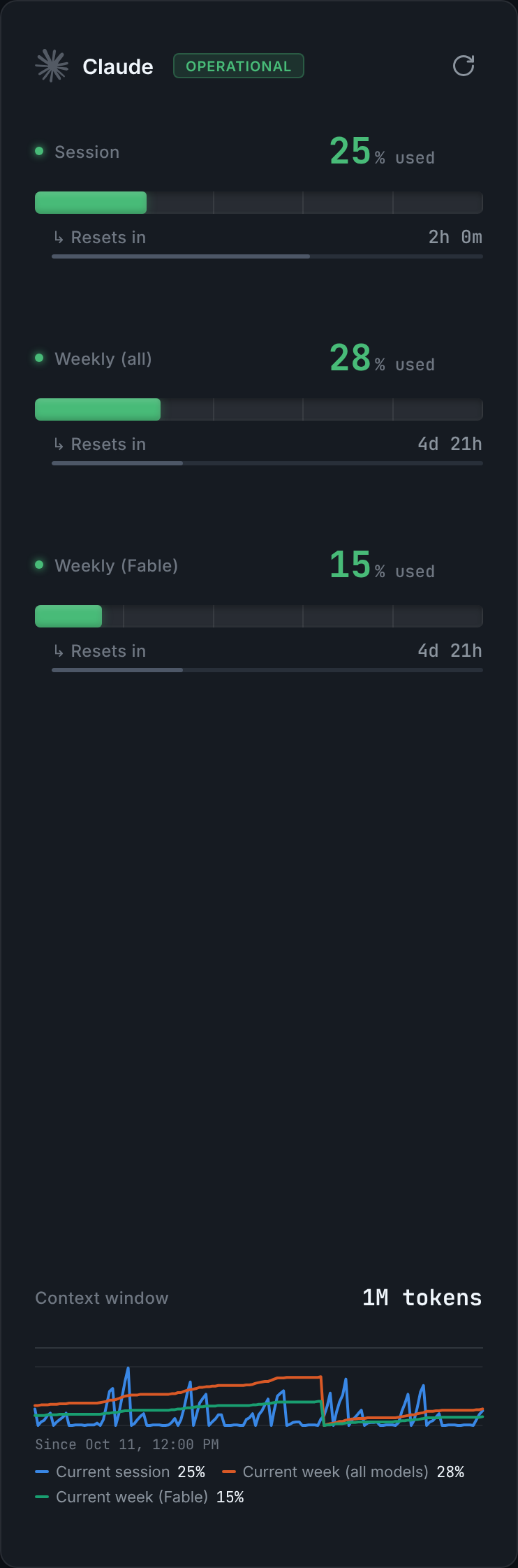
Agent Tank tracks all three Claude windows:
| Agent Tank window | type | model |
|---|---|---|
| Current session | session |
null |
| Current week (all models) | weekly |
null |
| Current week (Fable) | weekly |
Fable |
The weekly Fable window has model set to Fable; use model to tell it apart from the all-models weekly window. See the Claude Code usage limit tracker for how Agent Tank reads them.
Codex: five-hour and weekly windows
OpenAI documents Codex usage on ChatGPT plans in terms of a five-hour period and a week:
- Five-hour window. Usage estimates are given as local messages per five-hour period for Plus and Standard Business3. Pro plans currently have no five-hour limit4.
- Weekly window. Weekly limits may also apply5. OpenAI does not say how large the weekly limit is.
- One allowance for local and cloud work. Local messages and cloud chats share your plan’s usage allowance15.
OpenAI publishes message estimates per model, but they are not a quota you can count on. These estimates are not fixed message limits; usage varies by model, task size, tools and caching16. Check where you actually stand in the usage dashboard (chatgpt.com/codex/settings/usage), or /status in an active Codex CLI session17.
Per-model windows. Codex can report separate limits for individual models, and Agent Tank keeps them as their own windows with model set, for example GPT-5.3-Codex-Spark in Agent Tank 0.10.0. OpenAI’s models page notes that GPT-5.3-Codex-Spark retired on September 14, 202618, so expect per-model windows to come and go with the models on offer.
Credits. Credits are the unit used to pay for eligible usage on credit-based plans, charged per million tokens at model-specific rates19. Agent Tank reports the credit balance as credits, separately from the windows, because it is a balance rather than a time window.
| Agent Tank window | type | model |
|---|---|---|
| 5h limit | five_hour |
null |
| Weekly limit | weekly |
null |
| GPT-5.3-Codex-Spark 5h limit | five_hour |
GPT-5.3-Codex-Spark |
Some accounts only expose the weekly window, and then Agent Tank reports no five_hour window. More on the OpenAI Codex usage limit tracker.
Antigravity: grouped quotas
Google sets Antigravity quota by plan and refreshes it on two timescales:
- Google AI Pro6: a high, generous quota, refreshed every five hours until the weekly limit is reached7.
- Google AI Ultra20: the highest, most generous quota, refreshed every five hours, with the highest weekly rate limits21.
- Other plans: a meaningful quota, refreshed weekly22.
Quota is not a request count. The rate limits correlate with the amount of work done by the agent23, so a long agent task uses more than a quick question. Google does not publish the size of any quota. Usage limits for this service are subject to modification24.
Quota is grouped by model family. The model selector shows quota per group (Gemini Models; Claude and GPT models), each with a Weekly Limit Remaining and a Five Hour Limit Remaining25. Gemini 4 Argon is available for Google AI Pro and Ultra in Google Antigravity26, and the Antigravity CLI reports it as a separate quota pool.
Agent Tank reports one window per group and limit, with the group name as model:
| Agent Tank window | type | model |
|---|---|---|
| Gemini · Five Hour Limit Remaining | five_hour |
Gemini |
| Gemini · Weekly Limit Remaining | weekly |
Gemini |
| Gemini 4 Argon Weekly Limit | weekly |
Gemini 4 Argon |
A limit that shows “Quota available” has no countdown yet: nothing is pending, so Agent Tank reports its resets_at and resets_in_seconds as null until a reset time appears. More on the Antigravity CLI usage limit tracker.
What happens when you hit a limit
This is what each provider documents; anything else (exact cool-downs, hidden buffers) is not published.
Claude Code
- Mid-response. Claude Code may keep working briefly to finish the step in progress and shows “Usage limit reached · wrapping up”; the extra work is small, capped and counts toward your weekly limit27.
- Your options. Enable usage credits, upgrade (Pro to Max 5x, Max 5x to Max 20x), buy API credits through a Claude Console account, or wait until your usage limits reset28.
- Usage credits. With usage credits enabled, requests switch to pay-as-you-go pricing on usage credits and keep working, billed at standard API rates29.
Codex
- Mid-turn. If you reach your usage limits during an active turn, the agent can continue working on that turn30.
- Credits. ChatGPT Plus and Pro users who reach their usage limit can purchase additional credits to continue working31.
- API key. All users may also run extra local chats using an API key, with usage charged at standard API rates32.
Antigravity
- Baseline quota used up. Once a model’s baseline quota is exhausted, the AI Credit Overages setting decides: Never (wait until the baseline quota refreshes) or Always (use purchased AI credits, consumed at standard Gemini Enterprise consumption pricing)33.
In every case, waiting for the window to reset gets you going again on your plan’s allowance, which is why the reset time matters as much as the percentage.
How to see where you stand
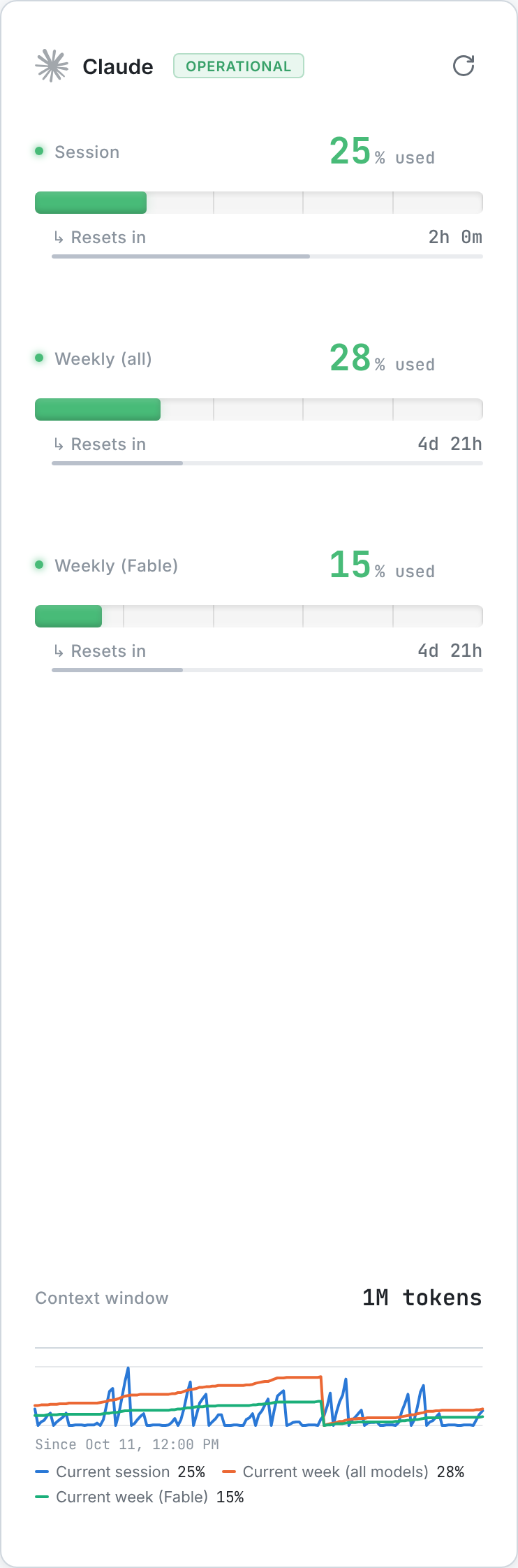
Each CLI shows its own limits (/status34 in Claude Code, /status in Codex), but only one provider at a time and only when you ask. Agent Tank keeps every window of every provider on one local dashboard, with a countdown to each reset:
The same data is on the local JSON API. List every window’s type, reset time and pace for each account:
curl -s http://127.0.0.1:3456/status | jq '.providers[] | {id, windows: [.windows[] | {type, label, resets_at, pace}]}'pace compares how fast you are using a window with how fast its time is running out: a ratio above 1 means usage is out-pacing the window, and burning_fast is true when you are on track to run out before it resets. It is null when there is no pace signal, such as a limit showing “Quota available”.
To stretch a window further, read how to avoid running out of limits mid-task; to compare the three providers, read Claude vs Codex vs Antigravity; to watch usage over time, see usage history.
Sources
Every plan name, number and limit behaviour above links to one of these official pages.
- Claude session window is rolling: claude.com/pricing (checked )
- Claude Max separate weekly Fable limit: support.claude.com/en/articles/11145838-use-claude-code-with-your-pro-or-max-plan (checked )
- Codex five-hour period (Plus and Standard Business): learn.chatgpt.com/docs/pricing (checked )
- Codex five-hour limit on Pro: learn.chatgpt.com/docs/pricing (checked )
- Codex weekly limits: learn.chatgpt.com/docs/pricing (checked )
- Antigravity paid plan name: Google AI Pro: antigravity.google/docs/plans (checked )
- Antigravity quota on Google AI Pro: antigravity.google/docs/plans (checked )
- Claude Pro and Max limit types: support.claude.com/en/articles/11145838-use-claude-code-with-your-pro-or-max-plan (checked )
- Claude and Claude Code share limits: support.claude.com/en/articles/11145838-use-claude-code-with-your-pro-or-max-plan (checked )
- Claude session limit window (hours): support.claude.com/en/articles/11049741-what-is-the-max-plan (checked )
- Claude weekly limit reset time: support.claude.com/en/articles/11049741-what-is-the-max-plan (checked )
- Where Claude shows the next reset time: support.claude.com/en/articles/11049741-what-is-the-max-plan (checked )
- Claude Max allowance relative to Pro: support.claude.com/en/articles/11049741-what-is-the-max-plan (checked )
- Claude message counts per plan: support.claude.com/en/articles/11049741-what-is-the-max-plan (checked )
- Codex local and cloud usage share one allowance: learn.chatgpt.com/docs/pricing (checked )
- Codex message estimates are not fixed limits: learn.chatgpt.com/docs/pricing (checked )
- Where Codex shows current limits: learn.chatgpt.com/docs/pricing (checked )
- GPT-5.3-Codex-Spark retirement: learn.chatgpt.com/docs/models (checked )
- What Codex credits are: learn.chatgpt.com/docs/pricing (checked )
- Antigravity paid plan name: Google AI Ultra: antigravity.google/docs/plans (checked )
- Antigravity quota on Google AI Ultra: antigravity.google/docs/plans (checked )
- Antigravity quota without Google AI Pro or Ultra: antigravity.google/docs/plans (checked )
- Antigravity limits depend on agent work, not request counts: antigravity.google/docs/plans (checked )
- Antigravity limits may change: antigravity.google/docs/plans (checked )
- Antigravity quota groups in the model selector: antigravity.google/docs/models (checked )
- Gemini 4 Argon availability: antigravity.google/docs/plans (checked )
- Claude Code behaviour when a limit is hit mid-response: support.claude.com/en/articles/11145838-use-claude-code-with-your-pro-or-max-plan (checked )
- Claude options when you reach a limit: support.claude.com/en/articles/11145838-use-claude-code-with-your-pro-or-max-plan (checked )
- Claude usage credits after a limit: support.claude.com/en/articles/12429409-manage-usage-credits-for-paid-claude-plans (checked )
- Codex behaviour when a limit is hit mid-turn: learn.chatgpt.com/docs/pricing (checked )
- Codex credits after a limit (Plus and Pro): learn.chatgpt.com/docs/pricing (checked )
- Codex API key fallback after a limit: learn.chatgpt.com/docs/pricing (checked )
- Antigravity behaviour when baseline quota is exhausted: antigravity.google/docs/plans (checked )
- Claude Code command to monitor remaining allocation: support.claude.com/en/articles/11145838-use-claude-code-with-your-pro-or-max-plan (checked )