Workflows
How fast am I using my Claude Code limit? Pace and burn rate
A usage percentage tells you how much of a limit is gone. It does not tell you whether that is a lot for this point in the window. This guide explains pace, the number Agent Tank puts next to every window to answer that question, works through it with sample data, and shows how to read it over time.
Plans and limits change often. Numbers here were checked on the dates listed under Sources; always confirm on the provider’s own pages.
What pace means
Every limit in Claude Code belongs to a window. Both Pro and Max plans have a five-hour session limit and a weekly limit1. Every plan has usage limits that reset on a rolling five-hour session window2. The weekly limit resets at a fixed time each week that is assigned to your account, regardless of when you start using Claude3. Within a window, two things move at the same time: the share of the limit you have used, and the share of the window’s time that has passed.
Pace is one divided by the other. If you have used half the limit and half the window has passed, you are exactly on pace: at the same rate you would reach the limit at the moment it resets. Use the same half with only a quarter of the window gone and you are going twice as fast as the clock. Use a quarter with half gone and you are going at half speed, with room to spare.
Read the ratio as a forecast with one assumption: that you keep working the way you have so far in this window. The ratio is roughly how much of the limit you will have used by the reset, so a ratio below 1 means the window resets before you run out, and one above 1 means you would reach the limit first. It is Agent Tank’s arithmetic on two numbers the CLI already reports, not a vendor figure. How five-hour and weekly usage windows work covers the windows themselves.
How Agent Tank reports pace
Agent Tank adds a pace object to each window in its API schema, or null when there is no pace signal. It has two fields:
ratio: Usage rate vs elapsed-time rate (above 1 means usage is out-pacing the window).burning_fast: Whether usage is on track to exhaust the window early. Agent Tank sets it once the ratio reaches 1.2, so a ratio slightly above 1 still readsfalse.
To know how much time has passed, Agent Tank takes the window’s length (5 hours for a session or five-hour window, 168 hours for a weekly one) and subtracts resets_in_seconds. These are the Claude windows from Agent Tank’s synthetic sample:
[
  {
    "label": "Current session",
    "used_percent": 25,
    "resets_in_seconds": 7200,
    "pace": {
      "ratio": 0.42,
      "burning_fast": false
    }
  },
  {
    "label": "Current week (all models)",
    "used_percent": 28,
    "resets_in_seconds": 421200,
    "pace": {
      "ratio": 0.92,
      "burning_fast": false
    }
  },
  {
    "label": "Current week (Fable)",
    "used_percent": 15,
    "resets_in_seconds": 421200,
    "pace": {
      "ratio": 0.49,
      "burning_fast": false
    }
  }
]The dashboard shows the same signal in two places: a thin bar under each reset countdown that fills as the window's time passes, and, when burning_fast is true, a badge such as "1.3x pace" next to the window's reset countdown, with "runs out in" and a time estimate. Under raw, each Claude window also keeps the intermediate values (expectedPercent, isBurningFast, etaSeconds, paceRatio, elapsedPercent and deltaPercent), which are not part of the canonical shape and may change between releases.
A worked example in fractions
Take the session window from the sample. used_percent is 25, so 1/4 of the limit is used. A session window lasts five hours4, and resets_in_seconds says 2 hours are left, so 3 hours have passed: 3/5 of the window. The pace is 1/4 ÷ 3/5 = 5/12, about 0.42, which is the ratio Agent Tank reported. At this rate the session would end with well under half of the limit used.
Now the weekly window. used_percent is 28, or 7/25 of the limit. 117 of the week’s 168 hours are left, so 51 have passed: 17/56 of the week. The pace is 7/25 ÷ 17/56 = 392/425, about 0.92. That is close to 1: this account would end the week with nearly all of its weekly limit used.
The weekly Fable window has its own ratio (0.49 in the sample), worked out the same way. Max plans also have a separate weekly limit for Fable5, so it can fill while the all-models window does not.
Reading the history sparklines
A ratio is a snapshot, and early in a window it swings a lot: one large task in the first hour of a session moves it far more than the same task near the end. Right at the start of a window, with usage but no time elapsed, the ratio cannot be computed and pace is null.
The usage history gives you the longer view. Agent Tank records every window on each refresh and keeps it for 14 days by default; --history-retention-days changes that. History needs Node.js 22.5+. Each dashboard card draws it as a sparkline:
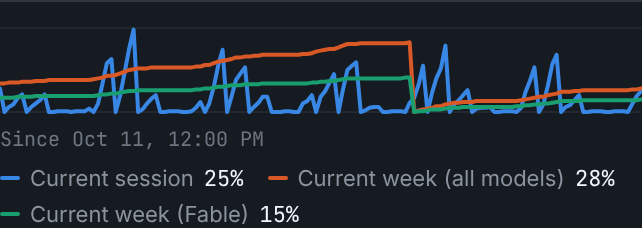
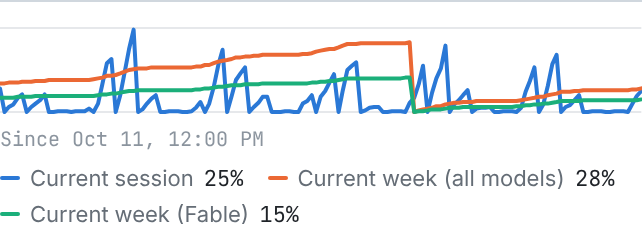
Read the weekly line against an imaginary diagonal from the bottom at the weekly reset to the top at the next one. A line that runs above that diagonal is a ratio above 1; one that stays below it is a ratio below 1. The session line is a sawtooth, so look at its peaks: peaks that touch the top most days mean the session is what stops you. To pull the weekly series yourself, use GET /history/:id:
curl -s 'http://127.0.0.1:3456/history/claude?metric=weeklyAll&view=chart' | jq -c '.series[0].points[-3:]'Session vs weekly pace
In the sample, the session ratio is 0.42 while the weekly one is 0.92. Both are true at the same time, because they cover different stretches. The session ratio describes the last few hours; the weekly one carries every day since the weekly reset. These limits are shared across Claude and Claude Code6, so work in the Claude apps counts in both.
- Low session, high weekly: a quiet afternoon after busy days. The session is in no danger, but the week is: plan for fewer heavy days before the weekly reset.
- High session, low weekly: one burst in an otherwise light week. You may wait for the session to reset, but the week is fine.
- Both high, for several weeks: the pattern that is Claude Max worth it for heavy Claude Code use looks at before a plan change.
For habits that keep a ratio down, such as checking headroom before a long task, see how to avoid running out of limits mid-task.
Codex and Antigravity
Agent Tank computes pace the same way for the other providers, using the same window lengths. For Codex, every five-hour and weekly window gets one, including per-model windows. OpenAI suggests the same habit for Codex: Check the dashboard every week or two to understand your pace and remaining capacity; if usage is higher than expected, consider whether a smaller model or tighter task scope would still produce a useful result7. For Antigravity, each model group’s five-hour and weekly windows get one, except a group with no countdown running: in the sample, Claude and GPT · Five Hour Limit Remaining has pace: null.
The highest ratio in the sample is the personal account’s Weekly limit at 1.19, with burning_fast still false, because it is below 1.2. To list every window above 1 across all accounts:
curl -s http://127.0.0.1:3456/status | jq -r '.providers[] | .id as $id | .windows[] | select(.pace.ratio > 1) | "\($id) · \(.label): pace \(.pace.ratio)"'Reading usage from a script or VS Code task has more ready-made checks, and getting started installs Agent Tank.
Sources
Every plan name, number and limit behaviour above links to one of these official pages.
- Claude Pro and Max limit types: support.claude.com/en/articles/11145838-use-claude-code-with-your-pro-or-max-plan (checked )
- Claude session window is rolling: claude.com/pricing (checked )
- Claude weekly limit reset time: support.claude.com/en/articles/11049741-what-is-the-max-plan (checked )
- Claude session limit window (hours): support.claude.com/en/articles/11049741-what-is-the-max-plan (checked )
- Claude Max separate weekly Fable limit: support.claude.com/en/articles/11145838-use-claude-code-with-your-pro-or-max-plan (checked )
- Claude and Claude Code share limits: support.claude.com/en/articles/11145838-use-claude-code-with-your-pro-or-max-plan (checked )
- OpenAI’s advice on Codex usage pace: learn.chatgpt.com/docs/pricing (checked )