Limits and plans
Claude usage credits explained
Usage credits, also called extra usage, are how a paid Claude plan keeps working after one of its limits is full. This guide explains who can turn them on, when requests start drawing on them, how the spend limit and auto-reload work, where to see your balance, and how Agent Tank reports them, using only Anthropic’s pages and Agent Tank’s own data.
Plans and limits change often. Numbers here were checked on the dates listed under Sources; always confirm on the provider’s own pages.
What usage credits are
A Claude plan comes with included usage, measured in time windows: a session limit and weekly limits. Usage credits are a separate, pay-as-you-go budget for what happens after a window is full. With usage credits enabled, requests switch to pay-as-you-go pricing on usage credits and keep working, billed at standard API rates4.
Usage credits are available on paid Claude plans (Pro, Max 5x and Max 20x) and apply to both Claude conversations and Claude Code terminal usage1. They are not the same thing as the monthly API credits that come with Max: Monthly API credits included with Max plans can’t be used in Claude Code or the Claude apps, including for usage credits5. And they are a charge of their own: Usage credits are charged separately from your paid Claude subscription and appear as additional charges on your bill2.
Usage credits are one of the options Anthropic lists when you reach a limit: Enable usage credits, upgrade (Pro to Max 5x, Max 5x to Max 20x), buy API credits through a Claude Console account, or wait until your usage limits reset6. Claude plans compared covers what each plan includes before you get that far.
When usage credits start being used
For the models your plan includes, nothing changes while your included usage has room. With usage credits enabled, once your five-hour session limit or one of your weekly limits is fully used, requests switch to pay-as-you-go pricing and keep working until you reach your monthly spend limit or your balance runs out with auto-reload off7.
Fable is the exception on some plans: On Pro plans and standard seats on Team plans, Fable 5 and Fable 5.1 aren’t included in the plan’s usage limits; they run on pay-as-you-go usage credits from the start8. There, choosing Fable spends usage credits even while your session and weekly windows have plenty of room.
On Max, that covers every limit the plan has: On Max, usage credits keep you working after your five-hour session limit, your general weekly limit, or your separate weekly limit for Fable9. So a full Fable window on Max can start drawing on usage credits while the all-models week still has room; the Claude Fable weekly limit on Max explains that window.
The moment of the switch is easy to misread. The approaching-limit notification may still show at the moment usage switches to usage credits; once the next request goes through on credits, it changes to “Now using credits”10. In other words, the warning you saw just before is not a cut-off; the next request simply runs on usage credits.
Two things stay as they were. Usage credits don’t affect the reset timing of any of these limits11, so your session and weekly windows still reset on their usual schedule. One window refilling is not always enough: your work runs on included usage again only once every limit that applies to the model you are using has room. A new session does not help while the weekly limit is full, and on Max a Fable request also needs room in the Fable window. Fable on Pro and Team standard seats stays on usage credits whatever the windows show. If you have not turned usage credits on, reaching a limit works as described in what happens when you hit the Claude weekly limit.
Spend limit, funds and auto-reload
You set usage credits up in Settings > Usage, in the Usage credits section3. There are three controls, and they do different jobs:
- The spend limit. You can set a monthly spending cap on usage credits, or choose unlimited spending12. In the settings, “Adjust limit” sets a monthly spend limit, and “Set to unlimited” removes spending restrictions13.
- Funds. Usage credits are a prepaid balance. You prepay to cover usage beyond your plan limits: click “Add funds”, enter the amount you want to purchase, then click “Purchase”14.
- Auto-reload. Auto-reload automatically makes a purchase when your balance falls below a threshold you set15. With it off, a balance that runs down stays down until you add funds.
Either one can end a run of extra usage: the spend limit for the month, or an empty balance with auto-reload off. Usage alerts notify you when you’re approaching your spend limits16. Claude Code adds a prompt of its own: On Pro and Max plans, when you reach your spend limit with usage credits still available, Claude Code prompts you to raise or remove the limit without leaving the CLI17.
A few conditions apply. In most cases usage credits do not expire; in certain jurisdictions such as Japan, usage credits expire six months after purchase starting September 10, 2026, and you get an email seven days before18. You can disable usage credits at any time in Settings > Usage; once disabled, you only have access to your plan’s included usage19. The rate follows Anthropic’s API pricing, with one caveat: Price and plans are subject to change at Anthropic’s discretion20.
Seeing your balance and spend in Claude
Anthropic shows usage credits in two places.
Settings > Usage
Settings > Usage shows real-time consumption, your month-to-date usage credit costs and your usage history21. The usage dashboard distinguishes between your included plan usage limits and any usage credit consumption22, so you can tell what the plan covered from what you paid for on top.
In Claude Code
/usage: /usage also shows a usage-credits row while usage credits are on23. On Pro and Max, the row shows your spend for the current month measured against your monthly spend limit; with no limit set, it shows Unlimited and no spend figure24./usage-credits: For Pro and Max subscribers, /usage-credits opens Settings > Usage on claude.ai, where you can turn usage credits on or off and check your credit balance, this month’s spend and your monthly spend limit; it isn’t available with API key authentication25.
The usage-credits row tells you what you have spent; the plan usage bars on the same screen tell you whether you are on included usage at all.
How Agent Tank reports usage credits
Agent Tank reads Claude’s windows, not its billing. Its canonical response has a credits field, but that field is not where Claude’s budget goes. In the schema, credits is described as: Codex credit balance; null for other providers or when Codex doesn't report one. Its unit adds: Always "credits". Claude's extra usage is a dollar budget, not credits, and stays under raw.usage.extraUsage.
So for Claude, credits is always null, and the extra-usage budget, when Claude reports one, stays in the untouched payload under raw.usage.extraUsage. The provider object reference lists both fields. To read them side by side:
curl -s http://127.0.0.1:3456/status/claude | jq '{credits, extraUsage: .raw.usage.extraUsage}'Agent Tank’s synthetic Claude sample shows the canonical side. Its credits is null, and its raw.usage holds only the three windows, with no extraUsage entry:
{
  "id": "claude",
  "provider": "claude",
  "plan": "max",
  "credits": null,
  "raw_usage_keys": [
    "session",
    "weeklyAll",
    "weeklyFable"
  ]
}Treat anything under raw as Claude’s own shape, which can change between Claude Code versions and between the /usage and API modes. Agent Tank does not convert it into a balance, a percentage or a window. For the balance and month-to-date spend, Settings > Usage and /usage are the places to look.
Seeing the switch coming
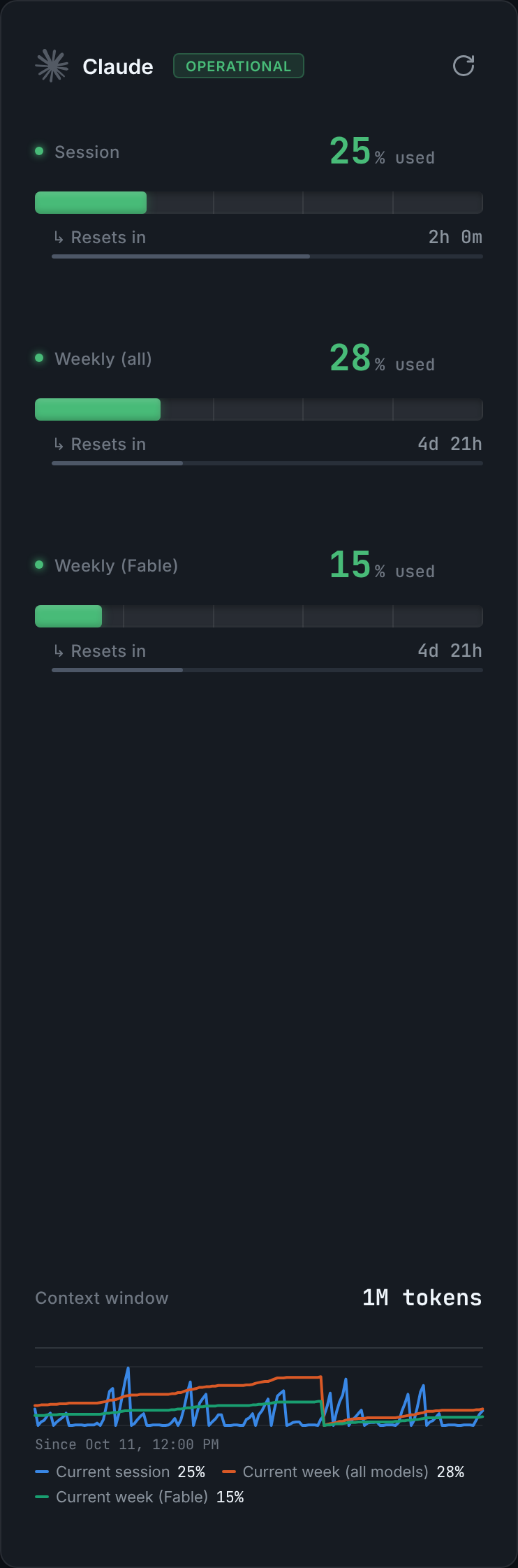
What Agent Tank does show well is the point where usage credits would take over: a window at the top. The dashboard card lists every Claude window with its reset time:
In a script, print each window on one line:
curl -s http://127.0.0.1:3456/status/claude | jq -c '.windows[] | {label, used_percent, resets_at}'A window near the top, with its pace.ratio above 1, is where extra usage is likely to start if you keep working at the same rate. How fast am I using my Claude Code limit? explains how to read pace, and its resets_at tells you when that window frees up. Included usage returns only when every window that applies to your model has room.
If you legitimately have more than one Claude account, each has its own usage credits settings and its own windows. The Claude Code usage limit tracker page explains how Agent Tank reads Claude, and getting started installs it.
Sources
Every plan name, number and limit behaviour above links to one of these official pages.
- Which plans and apps usage credits cover: support.claude.com/en/articles/12429409-manage-usage-credits-for-paid-claude-plans (checked )
- Claude usage credits are billed separately from the plan: support.claude.com/en/articles/12429409-manage-usage-credits-for-paid-claude-plans (checked )
- Where to enable Claude usage credits: support.claude.com/en/articles/12429409-manage-usage-credits-for-paid-claude-plans (checked )
- Claude usage credits after a limit: support.claude.com/en/articles/12429409-manage-usage-credits-for-paid-claude-plans (checked )
- Claude Max API credits do not cover Claude Code: support.claude.com/en/articles/11145838-use-claude-code-with-your-pro-or-max-plan (checked )
- Claude options when you reach a limit: support.claude.com/en/articles/11145838-use-claude-code-with-your-pro-or-max-plan (checked )
- Claude usage credits after the weekly limit: support.claude.com/en/articles/12429409-manage-usage-credits-for-paid-claude-plans (checked )
- Fable on Pro plans and Team standard seats: support.claude.com/en/articles/15424964-claude-fable-models-on-your-plan (checked )
- Which Max limits usage credits cover: support.claude.com/en/articles/11145838-use-claude-code-with-your-pro-or-max-plan (checked )
- Claude “Now using credits” notification: support.claude.com/en/articles/12429409-manage-usage-credits-for-paid-claude-plans (checked )
- Claude usage credits and reset times: support.claude.com/en/articles/12429409-manage-usage-credits-for-paid-claude-plans (checked )
- Claude usage credits monthly spending cap: support.claude.com/en/articles/12429409-manage-usage-credits-for-paid-claude-plans (checked )
- Claude usage credits spend limit controls: support.claude.com/en/articles/12429409-manage-usage-credits-for-paid-claude-plans (checked )
- Claude usage credits are prepaid: support.claude.com/en/articles/12429409-manage-usage-credits-for-paid-claude-plans (checked )
- Claude usage credits auto-reload: support.claude.com/en/articles/12429409-manage-usage-credits-for-paid-claude-plans (checked )
- Claude usage credits usage alerts: support.claude.com/en/articles/12429409-manage-usage-credits-for-paid-claude-plans (checked )
- Claude Code spend-limit prompt: code.claude.com/docs/en/costs (checked )
- Claude usage credits expiry: support.claude.com/en/articles/12429409-manage-usage-credits-for-paid-claude-plans (checked )
- Turning Claude usage credits off: support.claude.com/en/articles/12429409-manage-usage-credits-for-paid-claude-plans (checked )
- Claude usage credits pricing may change: support.claude.com/en/articles/12429409-manage-usage-credits-for-paid-claude-plans (checked )
- Where to monitor Claude usage credits: support.claude.com/en/articles/12429409-manage-usage-credits-for-paid-claude-plans (checked )
- Claude usage dashboard separates included usage from usage credits: support.claude.com/en/articles/12429409-manage-usage-credits-for-paid-claude-plans (checked )
- Claude Code /usage usage-credits row: code.claude.com/docs/en/costs (checked )
- Claude Code /usage usage-credits row on Pro and Max: code.claude.com/docs/en/costs (checked )
- Claude Code /usage-credits command: code.claude.com/docs/en/costs (checked )