Limits and plans
What happens when you hit the Claude weekly limit
A session limit costs you an afternoon; a weekly limit can cost you the rest of the week. This guide explains how the Claude weekly limit differs from the five-hour session limit, what Claude Code does when you reach it, when it resets and how to read the reset time, using only what Anthropic documents and what Agent Tank shows.
Plans and limits change often. Numbers here were checked on the dates listed under Sources; always confirm on the provider’s own pages.
The weekly limit vs the session limit
Both Pro and Max plans have a five-hour session limit and a weekly limit1. These limits are shared across Claude and Claude Code4, so chats in the Claude apps and Claude Code draw from the same weekly allowance.
- The session limit is short and rolling: Every plan has usage limits that reset on a rolling five-hour session window5.
- The weekly limit is long and fixed: The weekly limit resets at a fixed time each week that is assigned to your account, regardless of when you start using Claude3. Your reset day and time stay the same regardless of when you start using Claude or when your subscription begins, and you receive your full weekly allowance each cycle6.
- The weekly Fable limit sits beside it on Max: Max plans also have a separate weekly limit for Fable7.
The windows overlap: every session’s usage also counts toward the week, so a run of busy sessions fills the week. Once it is full, a new session window does not bring you back; the weekly limit holds until its own reset.
What Claude Code does when you reach a limit
You’ll see warning messages as you approach any limit8. At the limit itself, the message tells you which one you hit: The limit message (“You’ve hit your session limit” or “You’ve hit your weekly limit”) shows when the window resets; these windows are shared across all models, so switching models with /model does not restore access9.
Wrapping up
If a response is already running, Claude Code may keep working briefly to finish the step in progress and shows “Usage limit reached · wrapping up”; the extra work is small, capped and counts toward your weekly limit10. The wrap-up allowance applies only to a response already in progress, not to a new message sent after the limit; on Pro it applies up to once per weekly usage period, and on Max it can apply each time you reach a five-hour session limit, within your weekly limit11. So the wrap-up finishes a step; it is not extra room after the weekly limit.
Usage credits
Usage credits are Anthropic’s documented way to keep working past a full week. With usage credits enabled, once your five-hour session limit or one of your weekly limits is fully used, requests switch to pay-as-you-go pricing and keep working until you reach your monthly spend limit or your balance runs out with auto-reload off12. On Max, usage credits keep you working after your five-hour session limit, your general weekly limit, or your separate weekly limit for Fable13. You turn them on in Settings > Usage, in the Usage credits section14, and You can set a monthly spending cap on usage credits, or choose unlimited spending15.
The switch can look like a cut-off: The approaching-limit notification may still show at the moment usage switches to usage credits; once the next request goes through on credits, it changes to “Now using credits”16. With usage credits enabled, requests switch to pay-as-you-go pricing on usage credits and keep working, billed at standard API rates17, so this is the point where a full week starts to cost money. Agent Tank keeps that budget in raw.usage.extraUsage, not in credits. Claude usage credits explained covers the spend limit and auto-reload.
Waiting and continuing automatically
If you would rather wait, On Claude Code v2.1.234 or later you can wait and continue the interrupted task automatically after the reset18. That turns a full week into a paused task rather than a lost one.
Limit resets
Some accounts are offered a reset. Limit resets are given occasionally to eligible plans; using one sets either your five-hour session limit or your weekly usage limit back to full, and your weekly limits still reset on their usual day and time19. The “Reset for free” button is in Settings > Usage on the web or in Claude Desktop and on the limit message; it isn’t currently available in Claude Code in your terminal or IDE20. Because they are given only occasionally, plan your week as if you will not have one.
When the weekly limit resets
The reset time belongs to your account, not to your first message of the week. You can see it in three places:
- The limit message itself, which shows when the window resets.
- In Claude Code: /usage shows session cost, plan usage limits and activity stats; /cost and /stats are aliases21. Claude Code runs some commands immediately without interrupting the response, such as /status and /usage22, so you can check it while a task is running.
- In the Claude apps: Settings > Usage23.
Usage credits do not move it: Usage credits don’t affect the reset timing of any of these limits24.
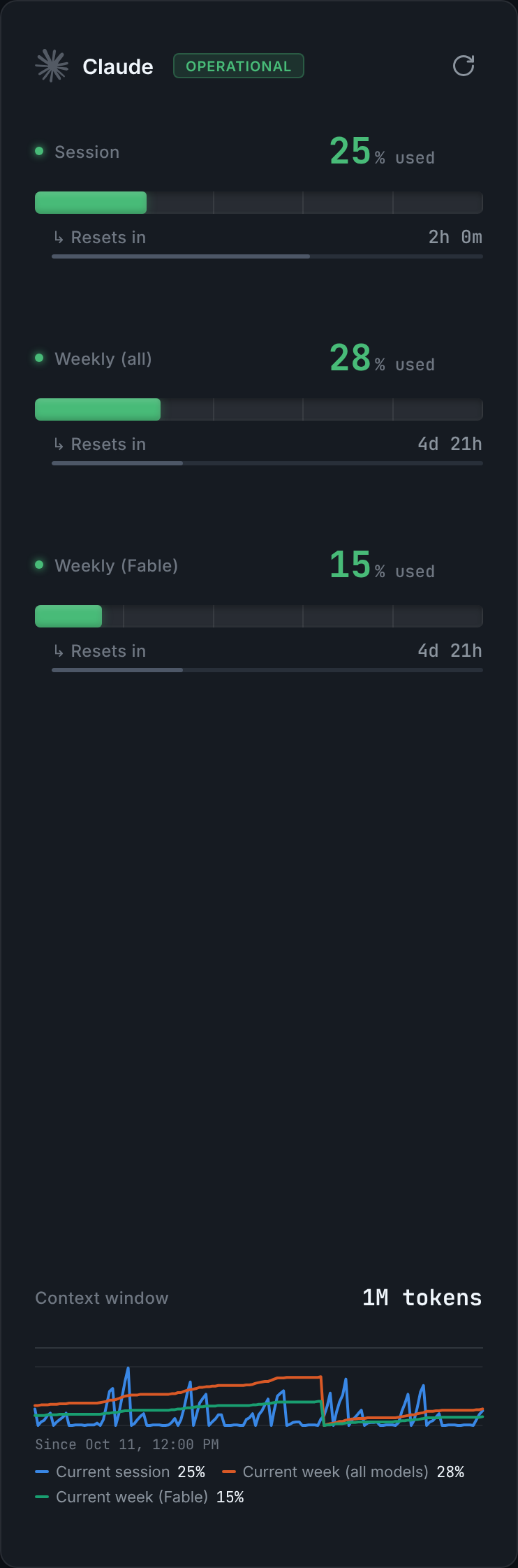
Agent Tank reports the same reset on every weekly window as resets_at (ISO 8601) and resets_in_seconds (a countdown). Here is the all-models weekly window from Agent Tank’s synthetic sample:
{
  "type": "weekly",
  "label": "Current week (all models)",
  "model": null,
  "used_percent": 28,
  "remaining_percent": 72,
  "resets_at": "2026-10-22T09:00:00.000Z",
  "resets_in_seconds": 421200,
  "pace": {
    "ratio": 0.92,
    "burning_fast": false
  }
}Under raw.usage.weeklyAll, the same sample keeps the limit as the CLI reported it, with resetsAt and a human-readable countdown in resetsIn:
{
  "label": "Current week (all models)",
  "percent": 28,
  "resetsAt": "2026-10-22T09:00:00.000Z",
  "resetsIn": "4d 21h",
  "resetsInSeconds": 421200
}Treat raw as the CLI’s own shape, which can change between modes and versions: Claude's own reset times stay display strings under raw, such as "12:20am (Europe/Berlin)"; read the ISO 8601 resets_at instead. The trailing Z in the sample means UTC, so convert it to your own time zone before planning around it.
Model-specific weekly limits
Not every “limit reached” is the all-models week. After a model-specific message such as “You’ve hit your Opus limit”, switching to a model outside that family with /model keeps you working25. The all-models limits are different, as the limit message above says.
Fable has its own weekly window on Max. The pricing table lists Fable on Max 5x and Max 20x as 50% of weekly limits26; on Pro it is listed under Usage credits27. In Agent Tank the two weekly windows share a type and differ by model: null for all models and "Fable" for the Fable window, each with its own used_percent and resets_at.
How to see it coming
A weekly limit gives days of warning if you look. The Agent Tank dashboard shows both weekly windows with a countdown to the reset:
In a script, ask the local API for the weekly windows and their pace:
curl -s http://127.0.0.1:3456/status/claude | jq '.windows[] | select(.type == "weekly") | {label, model, used_percent, resets_at, pace}'The pace object is the early warning. ratio: Usage rate vs elapsed-time rate (above 1 means usage is out-pacing the window). burning_fast: Whether usage is on track to exhaust the window early. A weekly ratio above 1 on day two is the moment to move heavy work, not day five. How to check Claude Code usage covers /usage and the other built-in views in more detail.
If it happens most weeks, look at your plan. Is Claude Max worth it for heavy Claude Code use? shows how to read your own pace before changing plans, and Claude plans compared lists what each plan includes.
What not to do
The ways out are the ones above: wait, use usage credits, change plan or use the API. Avoid the rest:
- Do not use someone else’s account. Anthropic’s terms say: You may not share your Account login information, Anthropic API key, or Account credentials with anyone else or make your Account available to anyone else28. Multiple accounts are only for people who legitimately have more than one, such as separate work and personal plans, and each keeps its own limits.
- Do not set an API key by accident. If the ANTHROPIC_API_KEY environment variable is set, Claude Code uses that key instead of your subscription, resulting in API usage charges rather than using your subscription’s included usage29. That is the right choice when you mean it and a surprise bill when you do not.
- Do not count on a fixed allowance. Anthropic may limit usage in other ways, such as weekly and monthly caps or model and feature usage, at its discretion30.
For habits that make a full week less likely, read how to avoid running out of limits mid-task. The Claude Code usage limit tracker page explains how Agent Tank reads Claude’s limits, and getting started installs it.
Sources
Every plan name, number and limit behaviour above links to one of these official pages.
- Claude Pro and Max limit types: support.claude.com/en/articles/11145838-use-claude-code-with-your-pro-or-max-plan (checked )
- Claude options when you reach a limit: support.claude.com/en/articles/11145838-use-claude-code-with-your-pro-or-max-plan (checked )
- Claude weekly limit reset time: support.claude.com/en/articles/11049741-what-is-the-max-plan (checked )
- Claude and Claude Code share limits: support.claude.com/en/articles/11145838-use-claude-code-with-your-pro-or-max-plan (checked )
- Claude session window is rolling: claude.com/pricing (checked )
- Claude weekly reset day and full weekly allowance: support.claude.com/en/articles/11049741-what-is-the-max-plan (checked )
- Claude Max separate weekly Fable limit: support.claude.com/en/articles/11145838-use-claude-code-with-your-pro-or-max-plan (checked )
- Claude Code warns as you approach a limit: support.claude.com/en/articles/11145838-use-claude-code-with-your-pro-or-max-plan (checked )
- Claude Code session and weekly limit messages: code.claude.com/docs/en/costs (checked )
- Claude Code behaviour when a limit is hit mid-response: support.claude.com/en/articles/11145838-use-claude-code-with-your-pro-or-max-plan (checked )
- When the Claude Code wrap-up allowance applies: support.claude.com/en/articles/11145838-use-claude-code-with-your-pro-or-max-plan (checked )
- Claude usage credits after the weekly limit: support.claude.com/en/articles/12429409-manage-usage-credits-for-paid-claude-plans (checked )
- Which Max limits usage credits cover: support.claude.com/en/articles/11145838-use-claude-code-with-your-pro-or-max-plan (checked )
- Where to enable Claude usage credits: support.claude.com/en/articles/12429409-manage-usage-credits-for-paid-claude-plans (checked )
- Claude usage credits monthly spending cap: support.claude.com/en/articles/12429409-manage-usage-credits-for-paid-claude-plans (checked )
- Claude “Now using credits” notification: support.claude.com/en/articles/12429409-manage-usage-credits-for-paid-claude-plans (checked )
- Claude usage credits after a limit: support.claude.com/en/articles/12429409-manage-usage-credits-for-paid-claude-plans (checked )
- Claude Code continue-after-reset option: code.claude.com/docs/en/costs (checked )
- What a Claude limit reset is: support.claude.com/en/articles/17007452-what-is-a-limit-reset (checked )
- Where to use a Claude limit reset: support.claude.com/en/articles/17007452-what-is-a-limit-reset (checked )
- Claude Code /usage command: code.claude.com/docs/en/commands (checked )
- Claude Code runs /status and /usage during a response: code.claude.com/docs/en/commands (checked )
- Where Claude shows the next reset time: support.claude.com/en/articles/11049741-what-is-the-max-plan (checked )
- Claude usage credits and reset times: support.claude.com/en/articles/12429409-manage-usage-credits-for-paid-claude-plans (checked )
- Claude Code model-specific limit messages: code.claude.com/docs/en/costs (checked )
- Fable on Max 5x and Max 20x (pricing table): claude.com/pricing (checked )
- Fable on the Pro plan (pricing table): claude.com/pricing (checked )
- Anthropic Consumer Terms: account sharing: www.anthropic.com/legal/consumer-terms (checked )
- ANTHROPIC_API_KEY takes precedence over a Pro or Max subscription: support.claude.com/en/articles/11145838-use-claude-code-with-your-pro-or-max-plan (checked )
- Claude additional usage limits at Anthropic’s discretion: support.claude.com/en/articles/11049741-what-is-the-max-plan (checked )