Workflows
How to check your Claude Code usage and remaining limits
Claude Code tells you how much of your plan you have used, but only when you ask. This guide shows where to look inside Claude Code, what each number on the usage screen means, how to read the reset times, and how to keep the same numbers in view all day without typing a command.
Plans and limits change often. Numbers here were checked on the dates listed under Sources; always confirm on the provider’s own pages.
The built-in way: /usage
The quickest check is inside Claude Code itself. Type /usage at the prompt. According to Anthropic’s command reference, /usage shows session cost, plan usage limits and activity stats; /cost and /stats are aliases1. You do not have to wait for Claude to finish: Claude Code runs some commands immediately without interrupting the response, such as /status and /usage2.
On a Pro or Max plan the top of that screen is not what matters to you. The Session cost block in /usage shows API token usage and is intended for API users; Pro and Max usage is included in the subscription, so that cost figure isn’t relevant for billing, and subscribers see plan usage bars instead3. On a Pro or Max plan you see up to three plan bars:
- Current session. How much of your current session you have used. Every plan has usage limits that reset on a rolling five-hour session window4. It is the limit you hit first during a long burst of work, and the one that comes back soonest.
- Current week (all models). How much of your weekly allowance you have used, across every model. The weekly limit resets at a fixed time each week that is assigned to your account, regardless of when you start using Claude5. You can have plenty of session left and still be stopped here.
- Current week (Fable). Max plans also have a separate weekly limit for Fable6. In Agent Tank’s provider notes this row is “Max accounts only”; on other plans it is simply absent.
Both Pro and Max plans have a five-hour session limit and a weekly limit7. These limits are shared across Claude and Claude Code8, so time spent chatting in the Claude apps moves the same bars as time in the terminal.
Below the bars there is more. On a Pro, Max, Team or Enterprise plan, /usage shows what counts against your plan limits, with recommendations9. The breakdown figures are approximate and computed from local session history on this machine, so usage from other devices or claude.ai is not included; press d or w to switch between the last 24 hours and the last 7 days10.
What /status adds
/status answers a different question: which account is Claude Code using? /status opens the Settings interface on the Status tab, showing version, model, account and connectivity11. Anthropic’s help centre also points to it: /status12 is the command they name to monitor your remaining allocation.
The account line matters more than it looks. If the ANTHROPIC_API_KEY environment variable is set, Claude Code uses that key instead of your subscription, resulting in API usage charges rather than using your subscription’s included usage13. If /status shows an API key or a Console login where you expected your Pro or Max account, your plan bars will not move, because the work is not being counted against the plan. If you’re already logged in to Claude Code via Claude Console pay-as-you-go, run /login from within Claude Code to switch to your subscription plan14.
Reading reset times
Every bar comes with a reset time. The session reset is relative to when your current session started, so it moves from day to day. The weekly reset is fixed for your account, so once you know it, it stays the same week after week.
Claude Code prints reset times for people, as a clock time with a time zone. Agent Tank keeps that text but also converts it for scripts. Claude's own reset times stay display strings under raw, such as "12:20am (Europe/Berlin)"; read the ISO 8601 resets_at instead.
Here is the session window from Agent Tank’s synthetic sample data. used_percent and remaining_percent always add up to 100, and resets_in_seconds is the countdown to resets_at:
{
  "type": "session",
  "label": "Current session",
  "model": null,
  "used_percent": 25,
  "remaining_percent": 75,
  "resets_at": "2026-10-17T14:00:00.000Z",
  "resets_in_seconds": 7200,
  "pace": {
    "ratio": 0.42,
    "burning_fast": false
  }
}The pace object compares how fast you are using the window with how fast its time is running out: a ratio below 1 means you should reach the reset before the limit. How five-hour and weekly usage windows work explains rolling and fixed windows in more detail.
Seeing it continuously with Agent Tank
/usage is a snapshot: you see it when you ask, inside the session you are in. You’ll see warning messages as you approach any limit15, but a warning arrives when you are already close. Agent Tank is a local dashboard that runs /usage for you on a schedule and keeps the result in view. By default, Claude usage is collected via PTY by running /usage.
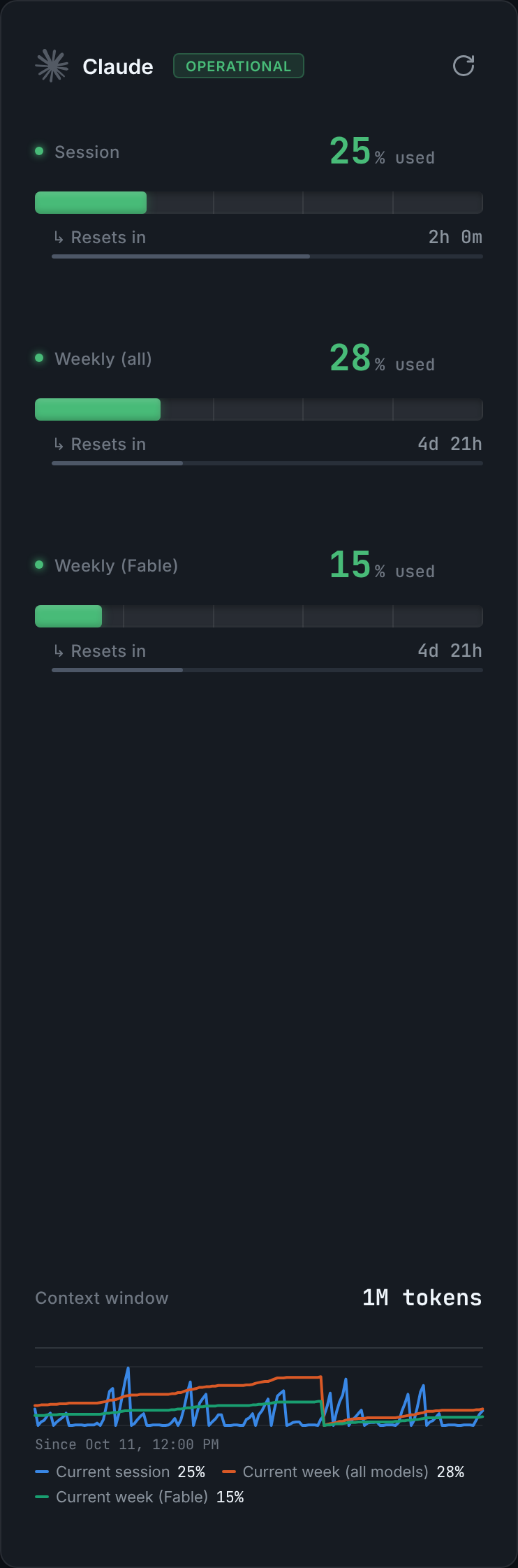
The same numbers are on Agent Tank’s local JSON API, so a status bar, a shell prompt or a script can read them. This prints the plan and each window’s usage and reset time:
curl -s http://127.0.0.1:3456/status/claude | jq '{plan, windows: [.windows[] | {label, used_percent, resets_at}]}'How Agent Tank fills plan: Claude's /status login method, lowercased ("max"). If Claude doesn't report a plan, it falls back to "max" when a weekly Fable window is present, and null otherwise. In the sample data it is "max". Ideas for using these numbers before you run out, such as gating a long task on headroom, are in how to avoid running out of limits mid-task.
Claude API mode (--claude-api)
By default Agent Tank opens Claude Code in a hidden terminal and reads the /usage screen, the same as you would. There is a second way:
agent-tank --claude --claude-apiWith --claude-api, Agent Tank reads the same Claude OAuth credentials the CLI already uses and calls https://api.anthropic.com/api/oauth/usage. This is usually faster and supports a shorter refresh interval. Expired OAuth tokens are refreshed when needed, and Agent Tank falls back to PTY mode if the API path fails.
It reads the same session and weekly limits; only the route is different. Claude API mode can also be enabled with AGENT_TANK_CLAUDE_API=1 or "claudeApi": true in the config file. It is usually faster than /usage and supports a shorter refresh interval (60 seconds). See Claude API mode in the configuration reference. Despite the name, this is not the pay-per-token Claude API: it reads your subscription usage, and it does not track API spend.
Multiple Claude accounts
If you legitimately have more than one Claude account, for example a work plan and a personal one, each has its own limits, and /usage only shows the account you are signed in to. Claude Code keeps each login in its config directory, and Agent Tank passes a separate one to each account as CLAUDE_CONFIG_DIR. Repeat --agent once per account:
agent-tank \
  --agent claude:work=~/.claude-work \
--agent claude:personal=~/.claude-personalEach account gets its own dashboard card, history and endpoint (/status/work, /status/personal). Sign in to each directory once with Claude Code before starting Agent Tank. The config-file version is under accounts and providers in the configuration reference. Use each account only as Anthropic’s terms allow. Track work and personal accounts together covers the same setup for Codex and Antigravity, with each vendor’s account terms.
Troubleshooting
/usageis missing or shows no plan bars. Agent Tank’s requirement for Claude Code is: Version 2.0+ required for /usage. Check withclaude --version; this release of Agent Tank was verified with Claude Code 2.1.302. Then check/status: plan bars only appear when you are signed in with a subscription.- “Showing last-known usage”. When the request for your plan limits fails, most often because the usage endpoint is rate limited, /usage shows the last usage bars it loaded on this machine within the past 60 minutes with a “Showing last-known usage” note; press r to retry16. A message such as “rate limited until 3:14am” in /usage means Claude Code can’t fetch your plan limits again until then, not that your work with Claude is limited17.
planisnullin Agent Tank. Claude Code did not report a login method and there is no weekly Fable window to infer one from. Your windows are still correct.context_windowisnull. How Agent Tank fills it: Looked up from the model Claude reports on /status (e.g. claude-opus-5-5) in Agent Tank's built-in table, reported with source "known-model", or set with the contextWindows config key (source "override"). A new model may not be in the table yet; the troubleshooting section shows how to add it.
For how Agent Tank reads Claude in more depth, see the Claude Code usage limit tracker page, and Claude plans compared if your weekly bar keeps filling before it resets. To install Agent Tank, start with getting started.
Sources
Every plan name, number and limit behaviour above links to one of these official pages.
- Claude Code /usage command: code.claude.com/docs/en/commands (checked )
- Claude Code runs /status and /usage during a response: code.claude.com/docs/en/commands (checked )
- Claude Code /usage cost figure vs plan usage bars: code.claude.com/docs/en/costs (checked )
- Claude session window is rolling: claude.com/pricing (checked )
- Claude weekly limit reset time: support.claude.com/en/articles/11049741-what-is-the-max-plan (checked )
- Claude Max separate weekly Fable limit: support.claude.com/en/articles/11145838-use-claude-code-with-your-pro-or-max-plan (checked )
- Claude Pro and Max limit types: support.claude.com/en/articles/11145838-use-claude-code-with-your-pro-or-max-plan (checked )
- Claude and Claude Code share limits: support.claude.com/en/articles/11145838-use-claude-code-with-your-pro-or-max-plan (checked )
- Claude Code /usage plan usage breakdown: code.claude.com/docs/en/costs (checked )
- Claude Code /usage breakdown is local to the machine: code.claude.com/docs/en/costs (checked )
- Claude Code /status command: code.claude.com/docs/en/commands (checked )
- Claude Code command to monitor remaining allocation: support.claude.com/en/articles/11145838-use-claude-code-with-your-pro-or-max-plan (checked )
- ANTHROPIC_API_KEY takes precedence over a Pro or Max subscription: support.claude.com/en/articles/11145838-use-claude-code-with-your-pro-or-max-plan (checked )
- Switch Claude Code from Console to a subscription with /login: support.claude.com/en/articles/11145838-use-claude-code-with-your-pro-or-max-plan (checked )
- Claude Code warns as you approach a limit: support.claude.com/en/articles/11145838-use-claude-code-with-your-pro-or-max-plan (checked )
- Claude Code /usage when the usage request fails: code.claude.com/docs/en/costs (checked )
- Claude Code /usage “rate limited until” message: code.claude.com/docs/en/costs (checked )